Chapter 5: Week 3, Session A — Introduction to Microsoft Copilot & Prompting Essentials
The Front Door — Copilot Across the Microsoft 365 Suite
1Chapter 5: Week 3, Session A — Introduction to Microsoft Copilot & Prompting Essentials
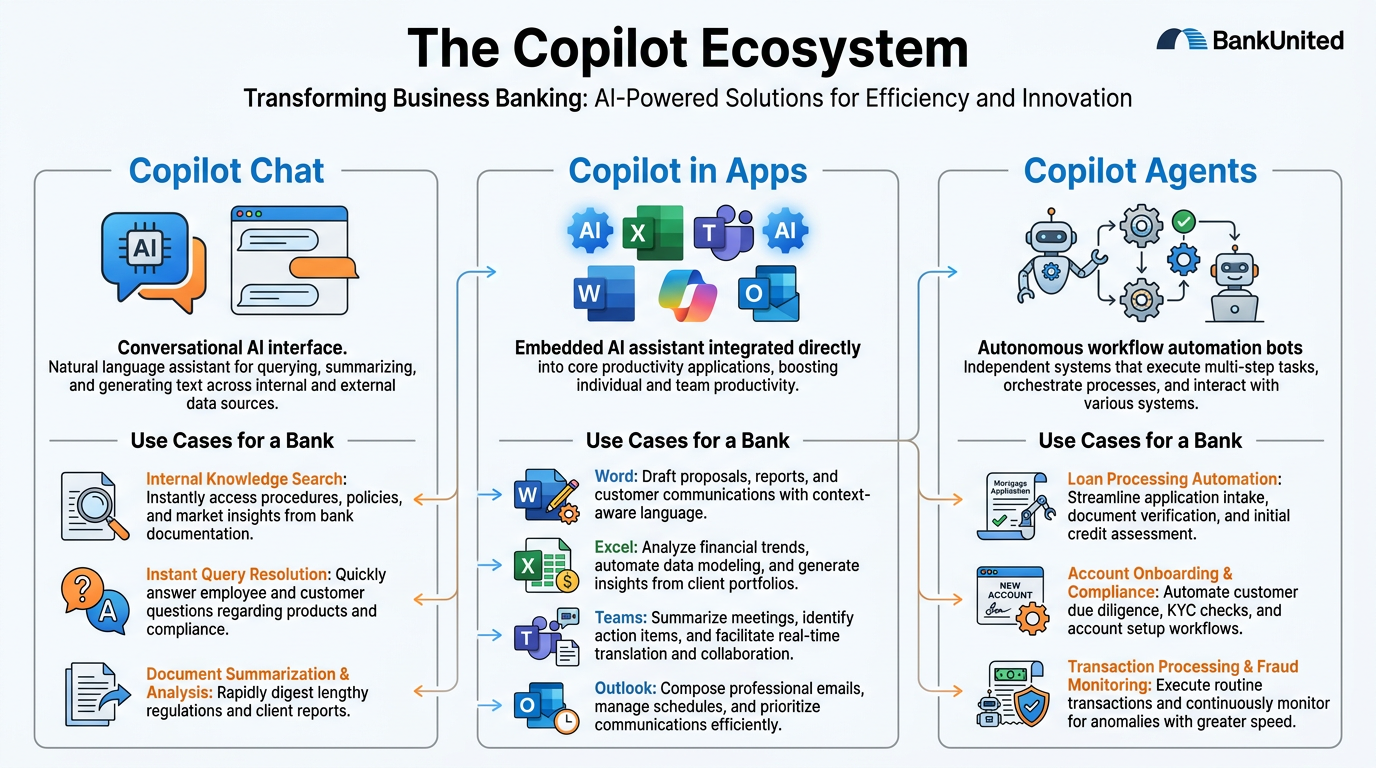
Figure 1:The Microsoft Copilot ecosystem for BankUnited — from the front door at m365.cloud.microsoft to the intelligence layer that grounds it in your work context, to the five prompting techniques that determine whether you get generic output or precise, professional results.
“The quality of your question determines the quality of your thinking.” — Peter Drucker
There is a version of Microsoft Copilot that is, frankly, underwhelming.
You type: “Write me a report on commercial real estate.”
Copilot dutifully returns four paragraphs of polished, completely generic prose that could have been written about any bank in any city in any year. It reads like a Wikipedia summary. You could have found better with a three-second web search. You close the window, return to your keyboard, and quietly conclude that AI is probably overhyped.
There is a second version of Microsoft Copilot — the version that the top performers in every organization that has deployed it eventually discover. In this version, you type a different kind of prompt. Copilot pulls from your actual emails, your recent meeting transcripts, the spreadsheet your analyst shared yesterday, and the memo your compliance officer sent last Friday. It gives you a first draft that reflects your tone, incorporates your institution’s specific numbers, and accounts for the regulatory context you operate in. It saves you forty-five minutes. Then it saves you another forty-five. Then it rewrites the way you work.
The difference between those two outcomes is not the software. It is the prompt.
This chapter is about the architecture that makes the second outcome possible — how Microsoft 365 Copilot actually works, where to find it, how it connects to your organizational data — and then the five prompting techniques that separate average users from power users. Master these, and Copilot stops being a curiosity and starts being your most capable colleague.
1.11. The Copilot Landscape: Not All Copilots Are Equal
Before we discuss prompting, we need to clear up a confusion that trips up most new users: Microsoft has multiple products with “Copilot” in the name, and they are not the same thing.
This is not a minor technical footnote. If you understand the distinction, you will know exactly which tool to reach for and why. If you don’t, you’ll end up frustrated that “Copilot” doesn’t have access to your files — because you’re using the wrong one.
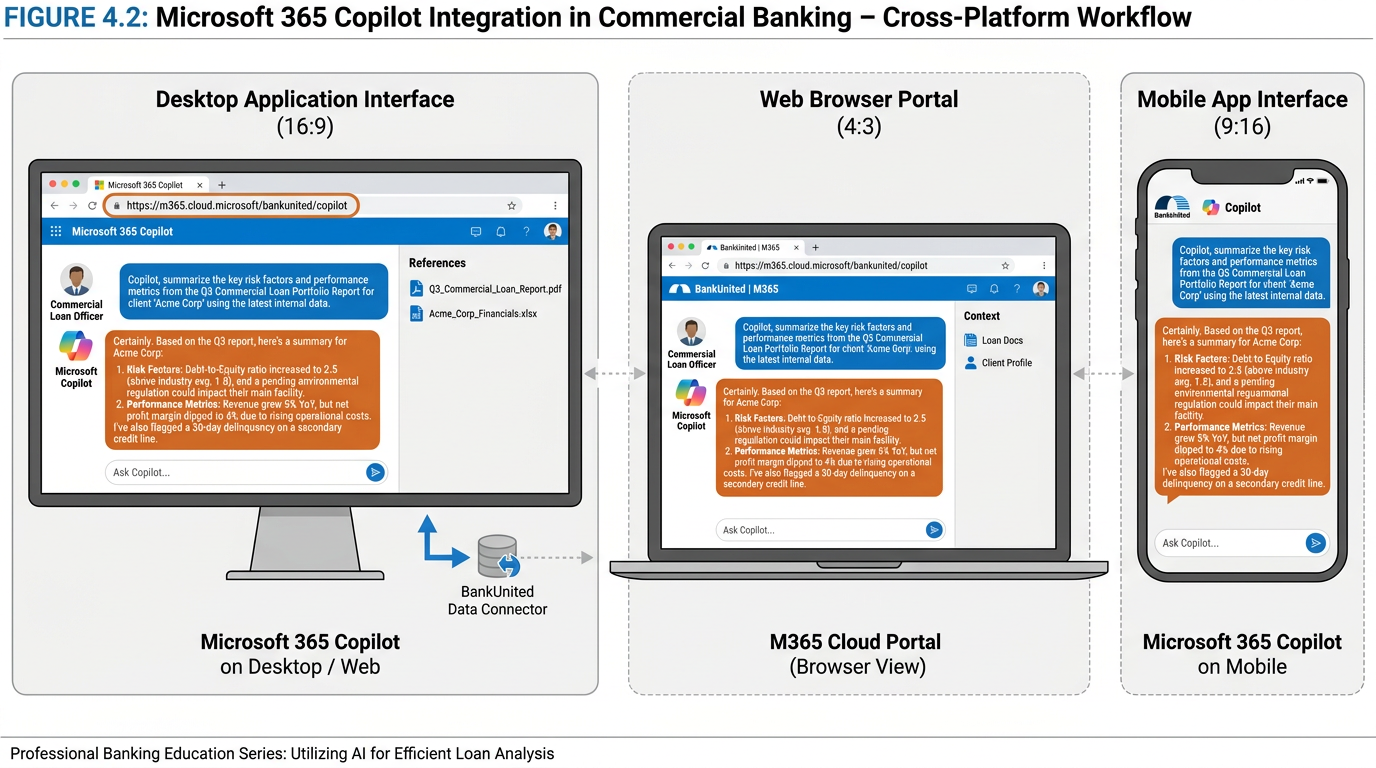
Figure 2:Microsoft 365 Copilot is accessible across desktop, web, and mobile — all through the m365.cloud.microsoft portal. The same conversation, the same context, wherever you work.
Think of it this way: imagine a hospital. They have a public information desk at the front entrance — anyone can walk in, ask questions, and get general health information. That’s useful. But when you need a specialist who actually knows your medical history, who can look at your chart and make recommendations based on your specific situation, you see a physician with access to your full record. That is a fundamentally different kind of help.
Copilot Chat (free, included in your Microsoft account) is the public information desk. It is web-connected, it can answer general questions, it can help you write a cover letter or explain a news story — but by default, it does not have access to your BankUnited emails, your SharePoint files, your Teams conversations, or any other organizational data. It is general-purpose. It is genuinely useful. But it is not your specialist.
Microsoft 365 Copilot (the paid license add-on that BankUnited has deployed) is the physician with your chart. It knows your organizational context. It connects to Microsoft Graph — the intelligence layer that maps your emails, your meetings, your chats, and your documents — and it uses that context to give you responses grounded in your actual work. When you ask it to summarize the key points from your conversation with a relationship manager last Tuesday, it can actually do that. When you ask it to draft a memo based on the spreadsheet your analyst shared this morning, it can pull that file.
Copilot Agents are a third category: specialized, purpose-built AI assistants configured to handle specific workflows. A Copilot Agent might be designed specifically to handle loan document review, or to automate a compliance reporting workflow, or to answer customer questions from a specific product knowledge base. These are more advanced and, for most BankUnited users in this course, are the horizon toward which we’re building — the payoff of foundational mastery.
What it is: A general-purpose AI assistant connected to the web.
What it can do:
Answer general questions using web search
Help draft documents, emails, and summaries
Explain concepts, analyze text you paste in
Work with content you explicitly share in the conversation
What it cannot do:
Access your BankUnited emails or calendars
Pull from your Teams chats or SharePoint files
Reference organizational documents without you pasting them in
Best for: General research, personal productivity, drafting when you have content to share manually.
Access: copilot
What it is: An AI assistant grounded in your organizational context via Microsoft Graph.
What it can do:
Access your emails, meetings, files, and chats (only what you have permission to see)
Draft documents referencing actual BankUnited files in SharePoint/OneDrive
Summarize Teams meetings you attended
Create Excel analyses from data in your tables
Search across your entire M365 ecosystem
What it cannot do:
Access data you don’t have permission to view
See other employees’ private files or emails
Go outside your Microsoft 365 security boundary
Best for: Everything in this course. This is your primary tool.
Access: m365.cloud.microsoft
What they are: Purpose-built AI assistants configured for specific workflows or knowledge bases.
What they can do:
Automate specific, repeatable workflows
Answer questions from a defined knowledge base (e.g., BankUnited product library)
Handle multi-step processes without step-by-step prompting
Integrate with specific systems beyond M365
What they require:
Configuration by IT or a designated Copilot admin
Clear definition of scope and data sources
Best for: Advanced use cases — loan processing assistance, compliance Q&A, customer service automation.
Access: Through Microsoft Copilot Studio (admin-configured)
1.22. The Front Door: m365.cloud.microsoft
Every powerful tool has an entry point. For Microsoft 365 Copilot, that entry point is m365.cloud.microsoft — the unified Microsoft 365 Copilot portal that brings together everything in one place.
Think of m365.cloud.microsoft the way you think of a bank’s main branch lobby: it’s not the only way to access services (you can also use the ATM, the drive-through, the mobile app), but it’s the hub — the place where everything connects and where you can do the most, all in one location.
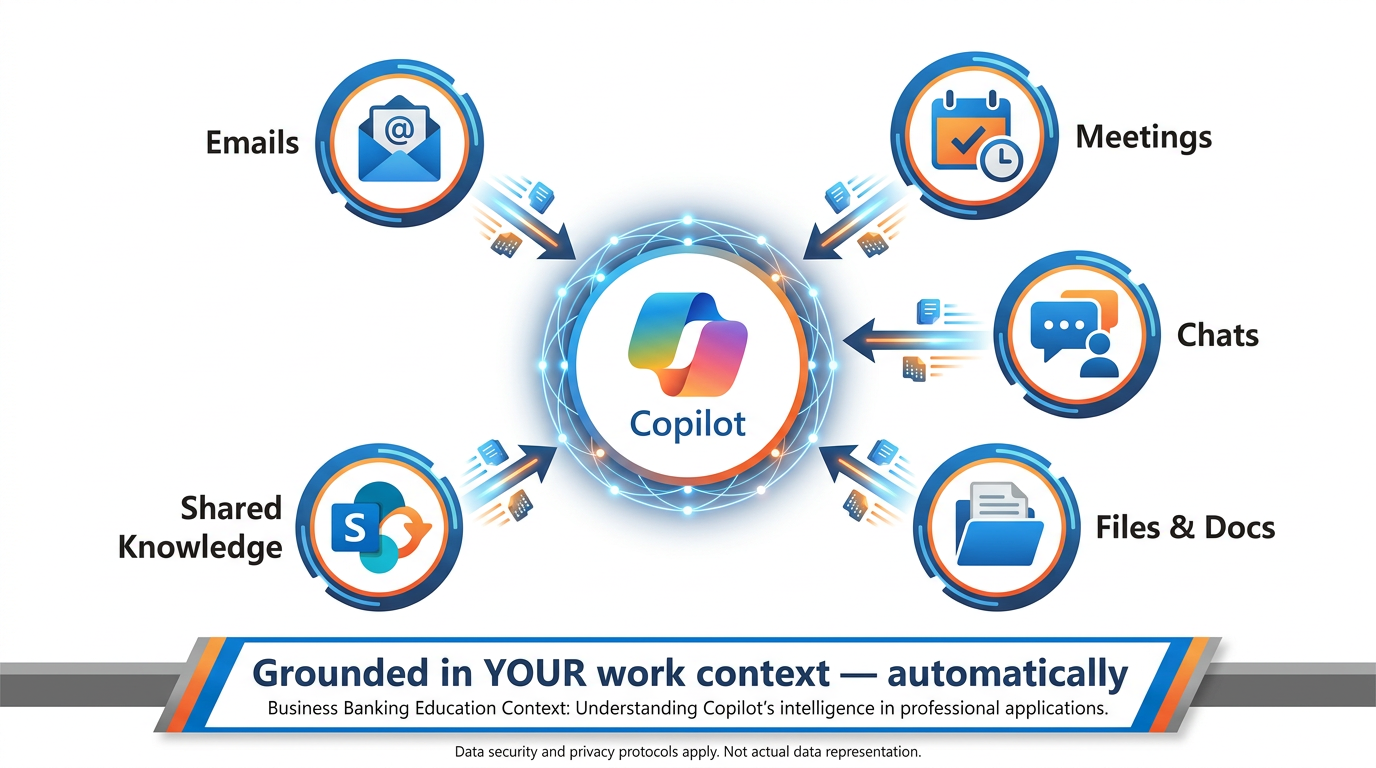
Figure 3:The Microsoft Graph intelligence layer — how Copilot grounds its responses in your actual organizational context. Every response is personalized to what you have permission to access, not generic web content.
What you’ll find at m365.cloud.microsoft:
The portal gives you access to the full Microsoft 365 Copilot experience from your browser — the same capability available through the Microsoft 365 Copilot desktop app and the mobile app. You can start conversations, manage ongoing threads, use the Prompt Gallery (more on this shortly), and access all Copilot integrations from a single authenticated session.
Three ways to access M365 Copilot:
Web: m365.cloud.microsoft — works in any modern browser, no installation required
Desktop: The Microsoft 365 Copilot app, available through your Microsoft 365 installation
Mobile: The Microsoft 365 Copilot mobile app (iOS and Android) — the same Copilot, on your phone, with the same access to your organizational data
Copilot embedded in the apps you already use:
m365.cloud.microsoft is the standalone experience. But Microsoft 365 Copilot also lives inside every app in your M365 suite — and for most BankUnited workflows, you’ll use it there rather than switching to the portal.
In Word: Copilot appears in the document margin. Ask it to draft a section, expand a paragraph, rewrite in a different tone, or summarize the document. You can reference a specific file from SharePoint by typing
/and the file name in your prompt.In Excel: Copilot appears in the ribbon on the Home tab. It can analyze data in a table, generate formulas, create charts, identify trends, and surface outliers — without you needing to write a single formula manually.
In Outlook: Copilot can draft email replies, summarize long email threads, and flag action items from your inbox.
In Teams: Copilot can summarize meetings you missed, recap decisions made during a call, and list action items — pulling from the meeting transcript in real time.
In PowerPoint: Copilot can generate slide decks from a document, reorganize presentations, and suggest design improvements.
The pattern across all of these is consistent: you stay in the tool you’re already using, and Copilot shows up as a natural part of the workflow. You don’t need to stop what you’re doing and go somewhere else.
Microsoft 365 Copilot Search:
The portal also includes Microsoft 365 Copilot Search — a universal search capability that works across all your M365 apps and connected third-party data. Instead of searching separately in Outlook, then SharePoint, then Teams, Copilot Search finds relevant content across your entire organizational ecosystem in a single query. For a relationship manager trying to find everything related to a specific client across emails, call notes, shared documents, and team chats — this alone is a significant capability.
1.33. Work IQ — The Intelligence Layer That Grounds Copilot in Your Context
Here is the feature that makes Microsoft 365 Copilot genuinely different from a general-purpose AI chatbot — and it is important enough that it deserves its own section.
When you ask a general AI tool a question, it answers from what it knows from training data — the internet, books, articles. That’s valuable. But it doesn’t know you. It doesn’t know what happened in your portfolio review meeting last Tuesday. It doesn’t know the memo your compliance team circulated last week. It doesn’t know the deal terms your relationship manager just shared via email.
Microsoft 365 Copilot uses Microsoft Graph to close that gap.
Microsoft Graph is the intelligence layer that maps your organizational context. Think of it as the connective tissue of your Microsoft 365 environment — it knows which emails you’ve sent and received, which meetings you’ve attended, which documents you’ve created and accessed, which chats you’ve had in Teams, and which files your colleagues have shared with you. It maps the relationships between all of this information and maintains that map in real time.
When you submit a prompt to Microsoft 365 Copilot, the system does something called grounding: before generating a response, Copilot accesses Microsoft Graph within your tenant to pull in relevant context from your actual work. If you ask “Summarize what I need to prepare for the Riverside Holdings meeting tomorrow,” Copilot doesn’t just give you generic meeting prep advice — it looks at the meeting invitation, pulls the agenda, finds relevant emails from recent weeks, locates documents shared with the attendees, and synthesizes all of that into a personalized briefing.
This process — the prompt going in, the grounding against your Microsoft Graph data, and the response coming out — all happens within your organization’s Microsoft 365 service boundary. Your data does not leave your tenant.
What grounding means in practice at BankUnited:
A commercial lender asks Copilot to draft a credit memo. Copilot pulls the relevant loan application documents from SharePoint, the financial statements shared by the client via email, and the notes from the last underwriting committee discussion — all automatically, because they’re already in the user’s M365 environment.
An operations manager asks Copilot to flag any compliance-related items from the last 30 days of email. Copilot searches the user’s inbox for relevant threads and surfaces a prioritized summary.
A relationship manager asks Copilot to prepare talking points for a client renewal conversation. Copilot finds the account history, recent correspondence, and product documentation in SharePoint and synthesizes key points for the meeting.
None of these require the user to manually attach files or paste content into the prompt. The intelligence layer does the retrieval automatically — because it already knows your work context.
The analogy that makes this click:
Imagine you have a brilliant new analyst who has been working alongside you for three months. They’ve attended every meeting with you, read every email you’ve sent and received, reviewed every document in your shared drive. When you ask them to help you prepare for a client meeting, they don’t need you to explain the history of the relationship — they already know it. They synthesize what they know into what you need.
That is what Microsoft Graph grounding does for Copilot. You don’t need to brief it every time. It already knows your context. You just need to ask the right question.
The honest caveat: the analogy breaks down when it comes to judgment and creativity. Your analyst builds genuine understanding and relationship intuition over time. Copilot’s “knowledge” is a structured map of your data — incredibly useful, but not a substitute for the contextual judgment you bring. The output it generates is always a first draft, not a final verdict. Microsoft itself is explicit about this in its product documentation: “Remember that Copilot generates a draft. You’ll need to verify and modify details to make sure it’s accurate and fits your tone and style.”
Read that sentence carefully. It is not a liability disclaimer buried in fine print. It is honest product guidance from Microsoft — and it is good professional practice.
1.44. The Microsoft 365 Copilot Prompt Gallery and Skilling Center
Before we get to the five prompting techniques, you need to know about two resources Microsoft has built specifically to help you get better at this faster.
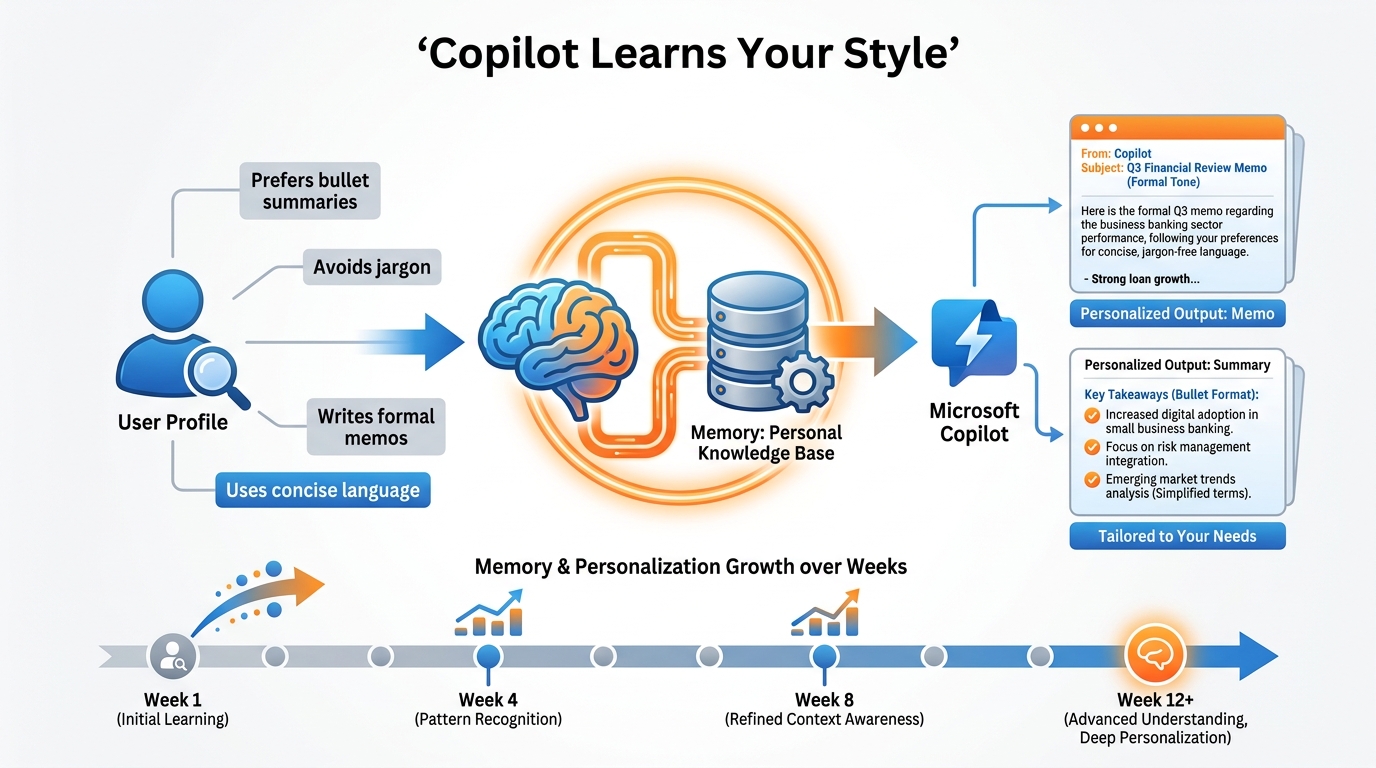
Figure 4:The Microsoft 365 Copilot Prompt Gallery (m365.cloud.microsoft/copilot-prompts) and the Copilot Skilling Center — Microsoft’s official resources for accelerating your prompting skills with verified, tested techniques organized by role and workflow.
The Copilot Prompt Gallery lives at m365
For BankUnited users, the gallery is your starting point, not your ceiling. Browse the finance and operations categories to find proven prompts you can adapt to your specific workflows. Then modify them using the five techniques in the next section to make them sharper, more specific, and more powerful.
The Microsoft 365 Copilot Skilling Center is the official learning hub at adoption
1.55. The Five Prompting Techniques
Now we get to the core of this chapter.
Microsoft 365 Copilot has access to your organizational context. It has sophisticated language models coordinating its responses. It is, architecturally speaking, a remarkable tool. But none of that matters if you don’t know how to talk to it.
Prompting is not a technical skill. It is a communication skill. The same way a well-constructed question to a colleague gets you a better answer than a vague one, a well-constructed prompt gets you better output from Copilot. The techniques below are not tricks — they are frameworks for clarity. Learn them, practice them, and they become second nature.
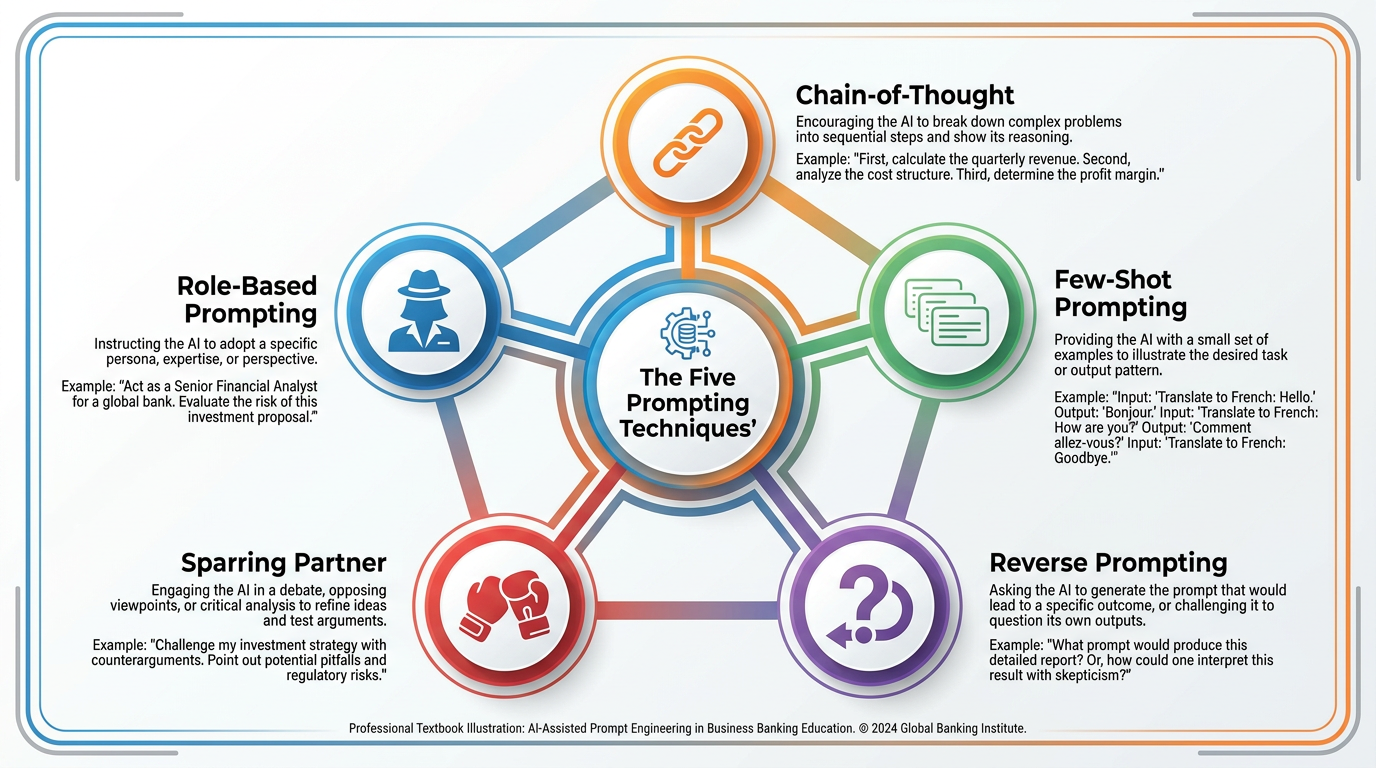
Figure 5:The five prompting techniques that separate average Copilot users from power users. Each addresses a different challenge: persona, reasoning transparency, learning from examples, requirement clarity, and critical pressure-testing.
1.5.1Technique 1: Role-Based Prompting
The core idea: Before asking Copilot to do something, tell it who it is.
This sounds almost comically simple. It is also the technique that produces the most immediate and dramatic improvement in output quality for most users.
Here is why it works: language models like the one powering Microsoft 365 Copilot don’t have a single fixed “voice” or perspective. They adapt their reasoning, vocabulary, tone, and framing based on the context they’re given. When you assign a role — “Act as a veteran commercial real estate underwriter with 20 years of experience” — you are not just changing the tone. You are shifting the entire conceptual frame from which Copilot approaches the task. The criteria it applies, the risks it looks for, the language it uses, the depth of analysis it attempts — all of these shift to match the assigned role.
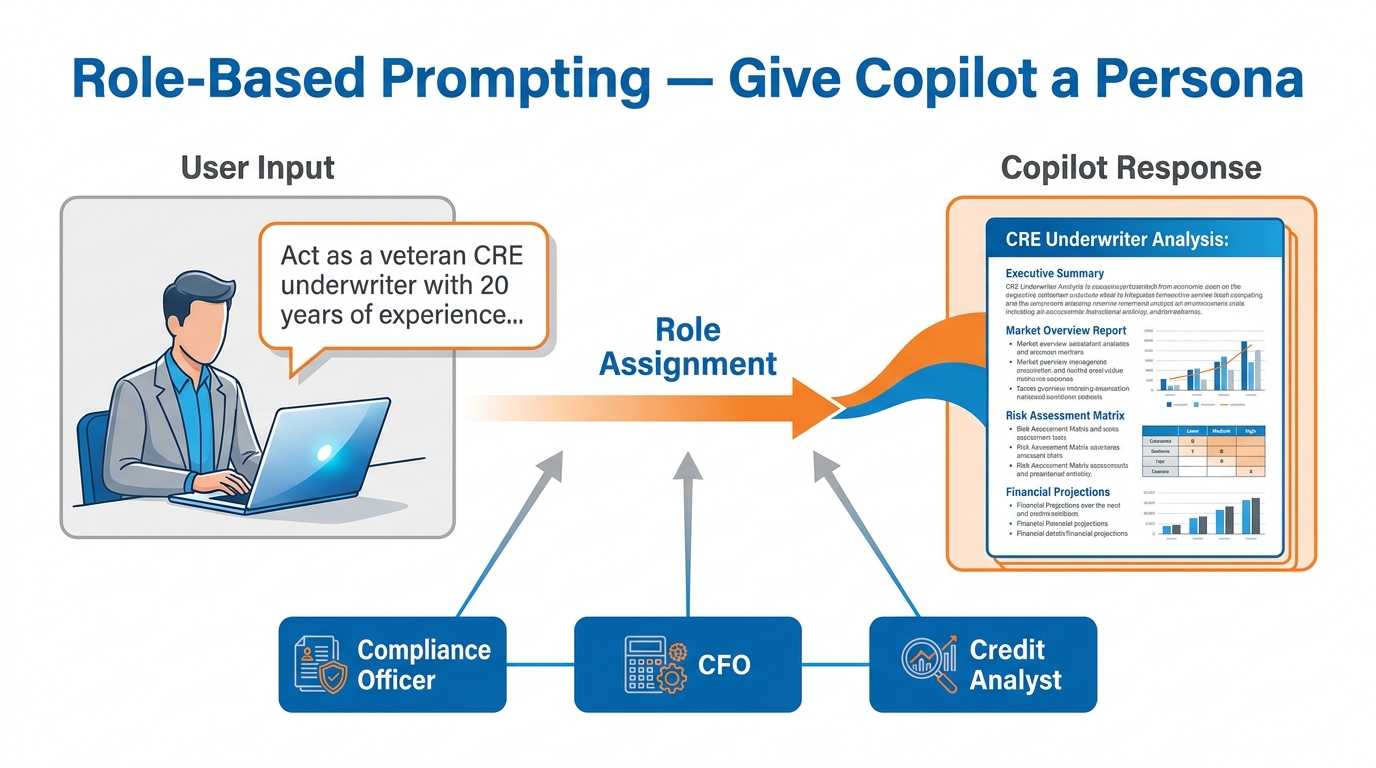
Figure 6:Role-Based Prompting transforms a generic request into a professional-grade inquiry by anchoring Copilot’s response in the expertise, analytical frame, and vocabulary of a specific role.
The analogy: Think about what happens when you call a law firm and ask a question. If you call the main line and speak to a receptionist, you get a polite general answer. If you ask to speak to the partner who handles commercial real estate transactions, you get a different kind of answer entirely — one that draws on specific expertise, that sees the risks you didn’t think to ask about, that speaks in the language of your actual problem.
Role-Based Prompting is how you route your request to the right expert, even when the expert is an AI.
Where the analogy breaks down: a real expert has genuine experiential judgment, client relationship memory, and liability stake in their advice. Copilot’s role adoption is sophisticated pattern matching, not lived expertise. You still bring the judgment. Copilot brings the synthesis and first draft.
The revolution this enables: Consider what it means for a compliance analyst to prompt Copilot as a “skeptical bank examiner reviewing this policy document for OCC alignment gaps.” Or for a relationship manager to prompt as a “CFO of a mid-market manufacturing company who is skeptical about borrowing right now.” Or for an operations manager to prompt as a “Six Sigma process improvement consultant looking for waste and bottlenecks.” Each role unlocks a different analytical lens — applied instantly, at scale, to your actual BankUnited materials.
Prompting template:
Act as a [specific role with relevant background].
Your task is to [specific task].
[Additional context about what you need.]
BankUnited examples:
Act as a cynical, veteran CRE underwriter with 20 years of experience
at a Southeast regional bank. Review the following property financial
summary and flag every assumption you would push back on in an
underwriting committee discussion.

[Paste or reference the financial summary]
Act as a BSA/AML compliance officer preparing for a quarterly regulatory review.
Read the following internal process document and identify any language that
could raise questions from an OCC examiner. Be specific about which
examiner guidelines each concern maps to.Act as a relationship manager who has known this client for five years.
Based on the following account summary and recent correspondence,
draft a renewal conversation agenda that acknowledges the relationship
history and anticipates the client's likely concerns about rate.1.5.2Technique 2: Chain-of-Thought Reasoning
The core idea: Ask Copilot to show its work before giving you the final answer.
This is one of the most counterintuitive techniques, because the instinct is always to ask for the answer — not the reasoning process. But in complex analytical tasks, asking for reasoning first produces dramatically better final answers. Here is why.
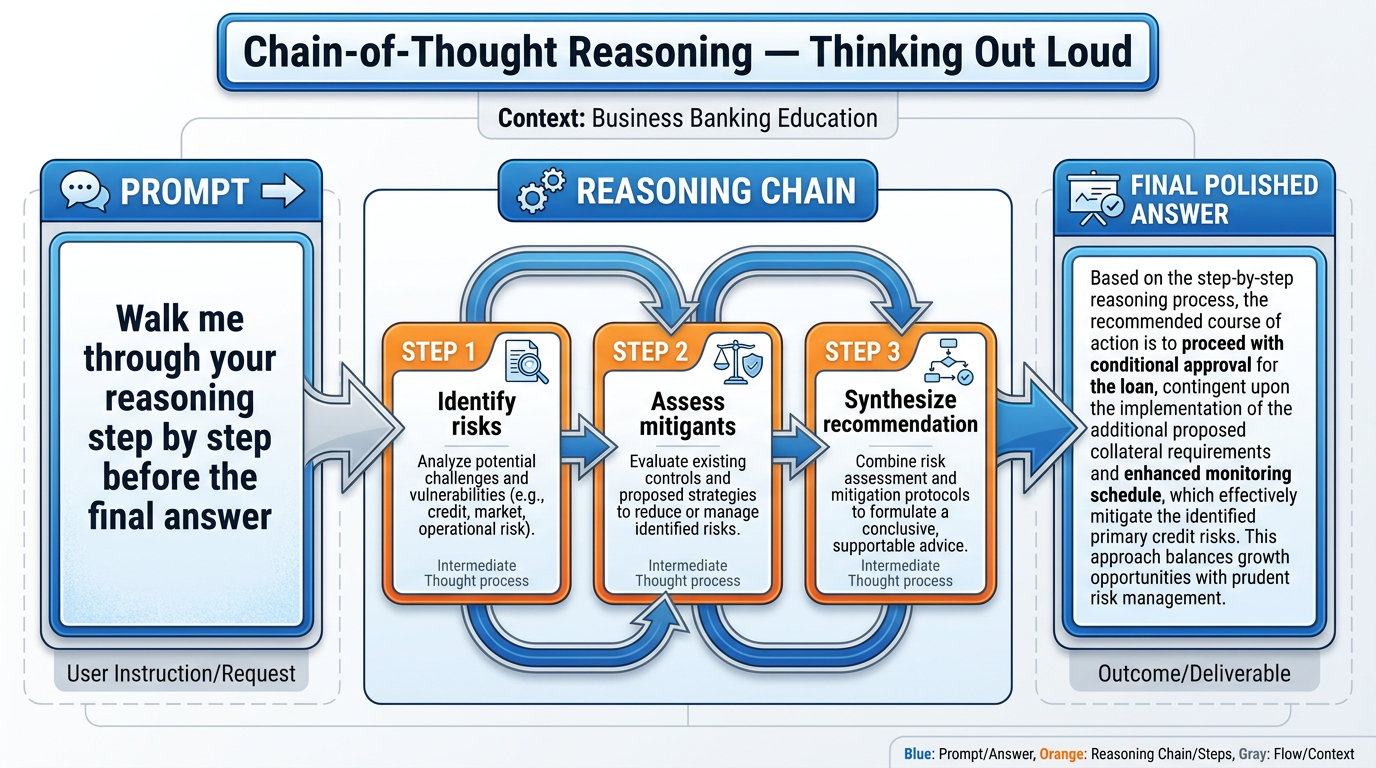
Figure 7:Chain-of-Thought Reasoning makes Copilot’s analytical process visible — each intermediate step can be reviewed, corrected, or redirected before the final answer, producing more reliable output for complex banking decisions.
When you ask Copilot directly for a conclusion, it pattern-matches toward the most statistically likely answer given the context. When you ask it to reason through the problem step-by-step, it builds each conclusion on the previous one — and that structured process tends to produce more coherent, internally consistent analysis. More importantly, it makes the reasoning visible, which means you can catch errors in the logic before they propagate into the conclusion.
The analogy: Think about a credit memo versus a credit decision. A credit decision (approve/decline, with a rate) is the conclusion. A credit memo is the reasoning chain — market analysis, borrower financials, collateral assessment, risk mitigants, stress testing — that makes the decision reviewable, auditable, and defensible. When Copilot shows its reasoning chain, you get the memo instead of just the verdict. That is almost always more useful, because you can engage with the analysis rather than just accepting or rejecting the conclusion.
Where the analogy breaks down: a credit memo is built on real due diligence by humans who are accountable for their analysis. Copilot’s reasoning chain is sophisticated generation — it should be reviewed for logical consistency, not treated as due diligence.
The prompting template:
Walk me through your reasoning step-by-step before giving me the final answer.
[Then state the task clearly.]
BankUnited examples:
I need to evaluate whether to recommend our bank's SBA 504 program
to a prospect who currently has a conventional commercial term loan
with us coming up for renewal.

Walk me through your reasoning step-by-step: what factors should I
consider, what are the trade-offs, and what questions do I need answered
before making a recommendation? Then give me your final recommendation framework.
A commercial deposit client who generates \$4.2M in average deposits
is asking us to match a competitor's offer that includes a higher yield,
dedicated treasury services, and a dedicated relationship manager.
We currently provide standard treasury services.
Walk me through your reasoning on whether to negotiate, match, or let
this client leave — then give me a prioritized recommendation with the
key risks clearly stated.Why Chain-of-Thought Works at a Technical Level
At the model architecture level, Chain-of-Thought prompting works because it forces the language model to generate tokens that represent intermediate reasoning before generating the final answer token sequence. Each step in the chain conditions the next step — creating a more constrained, coherent generation path than a direct-to-conclusion prompt allows.
In plain language: when you ask for the answer directly, Copilot takes a shortcut. When you ask for the reasoning first, it has to build the bridge piece by piece, and those intermediate pieces keep it on track. The final answer that comes out of a reasoning chain is usually more defensible than one that appeared directly.
This is also why Chain-of-Thought is particularly valuable in compliance-adjacent banking tasks: the reasoning chain is auditable. You can show it to a senior colleague or a regulator and explain why the analysis landed where it did.
1.5.3Technique 3: Few-Shot Prompting
The core idea: Show Copilot what “good” looks like before asking it to produce something new.
This technique is borrowed directly from machine learning — “few-shot learning” is the ability of a model to generalize from a small number of examples. Applied to prompting, it means you give Copilot two or three strong examples of the output you want, and then ask it to produce a new output in the same style.
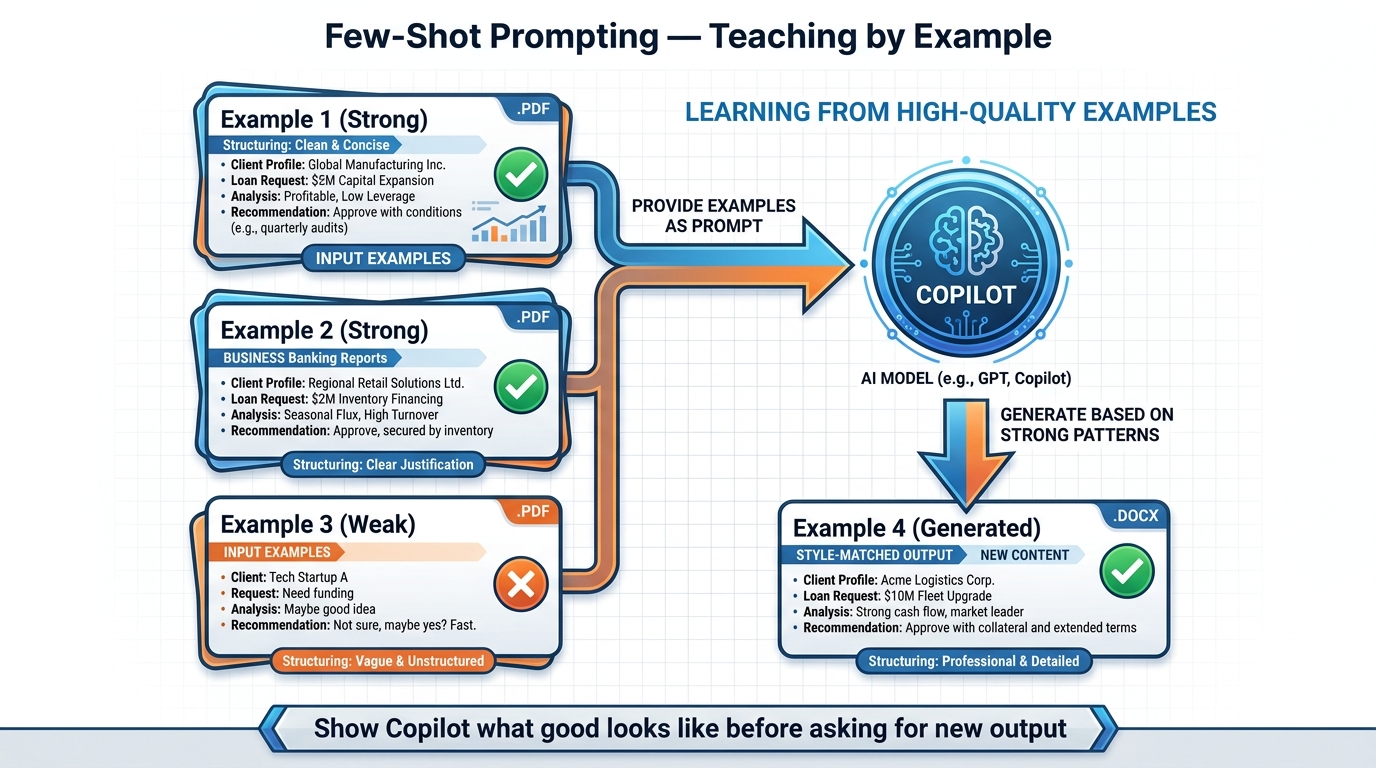
Figure 8:Few-Shot Prompting teaches Copilot by example — providing strong and weak examples establishes quality standards that Copilot replicates in new output, far more effectively than describing what you want in abstract terms.
The analogy: Think about how you onboard a new junior analyst who has strong technical skills but no institutional knowledge. You don’t hand them a style guide and tell them to write like the senior team. You hand them three or four examples of excellent credit memos written by your best people and say: “Write at this level. Match this structure. Aim for this depth.” They look at the examples, internalize the pattern, and produce work that fits the institutional standard.
This is exactly what few-shot prompting does. The examples are your institutional standard, communicated directly to Copilot.
Where the analogy breaks down: your analyst internalizes examples through genuine understanding, not pattern matching. Copilot extracts statistical patterns from your examples — which means if your examples have a systematic flaw or bias, Copilot will replicate that flaw. The “garbage in, garbage out” principle applies here more directly than in most other techniques.
The prompting template:
Here are [number] examples of [type of output].
[Example 1 — labeled "Strong" or "Weak" as appropriate]
[Example 2]
[Example 3]

Now [state the task]. Match the style, depth, and structure of the strong examples.
BankUnited examples:
Here are three examples of client relationship summary memos that our team
considers high quality, and one example of a weaker memo.

[EXAMPLE 1 — Strong: paste text]
[EXAMPLE 2 — Strong: paste text]
[EXAMPLE 3 — Weak: paste text]

Now write a relationship summary memo for the following client using the
structure and depth of the strong examples. Here is the raw account data:
[paste account information]
Here are two examples of the way our compliance team prefers to write
policy exceptions — concise, specific, with clear risk mitigation language
and no ambiguous qualifiers.
[EXAMPLE 1]
[EXAMPLE 2]
Now write a policy exception memo for the following situation:
[describe situation]Advanced application — the “Four Examples” method:
For complex output like proposals or memos, try four examples: two strong, one acceptable, one weak. Ask Copilot to explain what makes the strong examples better before generating new output. This forces a brief analysis step (a variation of Chain-of-Thought) that tends to sharpen the generation significantly.
1.5.4Technique 4: Reverse Prompting
The core idea: Instead of you asking Copilot a question, ask Copilot to ask you questions.
This is the technique that most surprises people when they first try it — because it inverts the natural instinct. We assume we know what we need and we try to describe it. The problem is that we often don’t know what we need precisely enough to describe it well. The resulting prompt is vague, the output is generic, and we conclude that Copilot isn’t that useful.
Reverse Prompting short-circuits this by letting Copilot do the requirement-gathering.
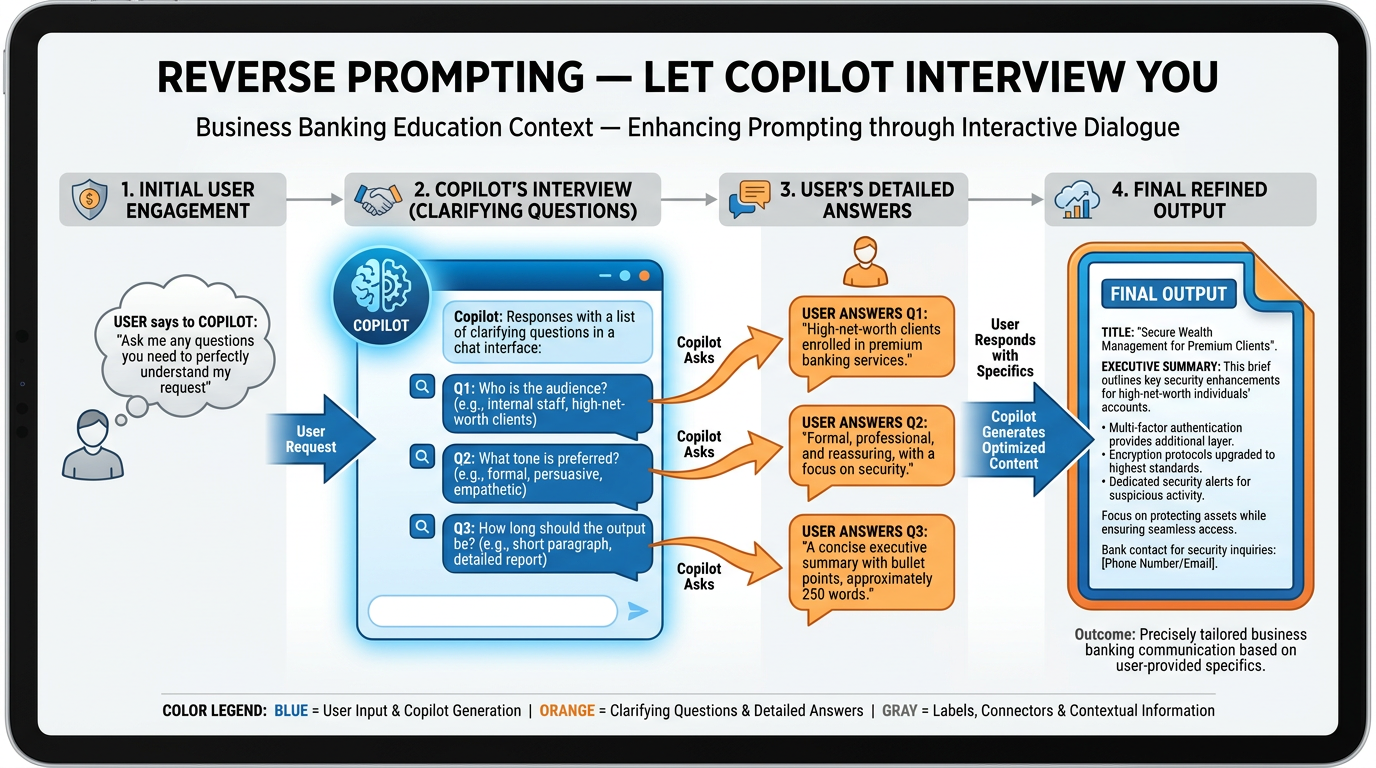
Figure 9:Reverse Prompting turns the dynamic around — instead of struggling to articulate requirements precisely, you let Copilot interview you. The questions Copilot asks reveal what it needs to know to produce genuinely useful output.
The analogy: Think about the difference between walking into a tailor with a vague request (“I need a suit for an important meeting”) versus answering a tailor’s structured questions (“What is the occasion? What is the dress code of the venue? What is your typical posture preference for jacket length? Do you prefer a two-button or three-button closure?”). The tailor who asks questions produces a significantly better outcome than the tailor who takes your vague description and starts cutting fabric. Reverse Prompting makes Copilot the skilled tailor.
Where the analogy breaks down: a skilled tailor’s questions are based on deep craft knowledge and an understanding of your specific situation. Copilot’s questions are good but may not always surface the most important uncertainty for your specific task. After it asks its questions, you should also add anything it didn’t think to ask.
The prompting template:
I need your help with [general description of task].
Before you start, ask me any questions you need to
perfectly understand my request and produce exactly
what I need. Don't proceed until I've answered.
BankUnited examples:
I need to write a presentation for our quarterly business review
with the commercial lending leadership team. Before you start,
ask me any questions you need to understand exactly what this
presentation should accomplish, who will be in the room, what
data I have available, and what format works best for our team.
I want to draft a proposal letter to a prospect we've been
courting for six months in the commercial construction space.
Before writing anything, ask me everything you need to know
about the relationship history, the prospect's current banking
situation, what we're proposing, and the tone I want.When Reverse Prompting works best:
Complex, multi-part deliverables (proposals, presentations, strategy memos)
Tasks where the audience or context matters significantly to the output
Situations where you’re not sure exactly what you want — but you know it when you see it
Tasks you’re doing for the first time with Copilot and haven’t yet developed a strong prompt template for
1.5.5Technique 5: The Sparring Partner
The core idea: Ask Copilot to push back on your ideas, not agree with them.
This is the most advanced technique in the set — and for many banking professionals, the most valuable. The default behavior of any AI assistant is to be helpful, which in practice means it tends to be agreeable. It will draft your memo, it will refine your proposal, it will polish your arguments. What it will not do, unless you specifically ask it to, is tell you where your thinking is weak.
The Sparring Partner technique flips this. You give Copilot a role defined by skepticism, and then you present your best thinking and ask it to attack it.
Figure 10:The Sparring Partner technique — Copilot assigned the role of a skeptical counterpart (CFO, credit committee, OCC examiner) pushes back on your best thinking, revealing weaknesses before they become problems in the real conversation.
The analogy: Think about moot court in law school. Law students argue their cases against experienced lawyers who deliberately try to find every hole in the argument. The goal is not to win the moot court — it is to discover every weakness in the case before the real court appearance, when the stakes are real. The sparring session is where the case gets stronger.
For banking professionals, the Sparring Partner technique is how you pressure-test your thinking before a credit committee review, a client negotiation, a board presentation, or a regulatory examination. Copilot, assigned the role of your toughest critic, will find the holes that your own confirmation bias is inclined to skip over.
Where the analogy breaks down: a real sparring partner in moot court knows the law, has genuine judgment, and cares about the outcome. Copilot’s pushback is sophisticated, but it is still pattern-matched critique rather than genuine adversarial reasoning. It may miss highly specific or contextual weaknesses that a real expert would catch. Use it as a first filter, not the only one.
The prompting template:
Play the role of [specific skeptical counterpart].
I am going to present [my idea/proposal/analysis].
Push back hard. Don't flatter me. Identify every weakness,
every assumption, every place where my reasoning is
vulnerable. Be direct.

[Present your idea/proposal/analysis]
BankUnited examples:
Play the role of a skeptical CFO of a \$200M revenue manufacturing
company who is cautious about taking on additional debt in the
current rate environment. I'm going to pitch you on refinancing
your current term loan with BankUnited and adding a revolving
credit facility. Push back hard. Don't accept my assumptions.
Tell me what objections you'd actually raise.

Here is my pitch: [present your pitch]
Play the role of a lead OCC examiner conducting a safety and
soundness review. I am going to present our commercial real estate
concentration management framework. Identify every area where
the examiner is likely to ask hard questions, where our documentation
is thin, and where our reasoning may not hold up under scrutiny.
Here is the framework: [paste the framework]Play the role of a credit committee member who has seen five
similar credits go bad in the last two years. I'm presenting
a \$7.5M construction loan for a mixed-use development in
Broward County. Find the weaknesses in my credit story.
Do not soften your feedback.
Here is my credit summary: [paste the summary]1.66. The Goldilocks Zone of Prompt Length
Now that you understand the five techniques, there is one meta-principle that governs all of them: the length and precision of your prompt determines the quality of your output, and there is a precision sweet spot — not too short, not too long.
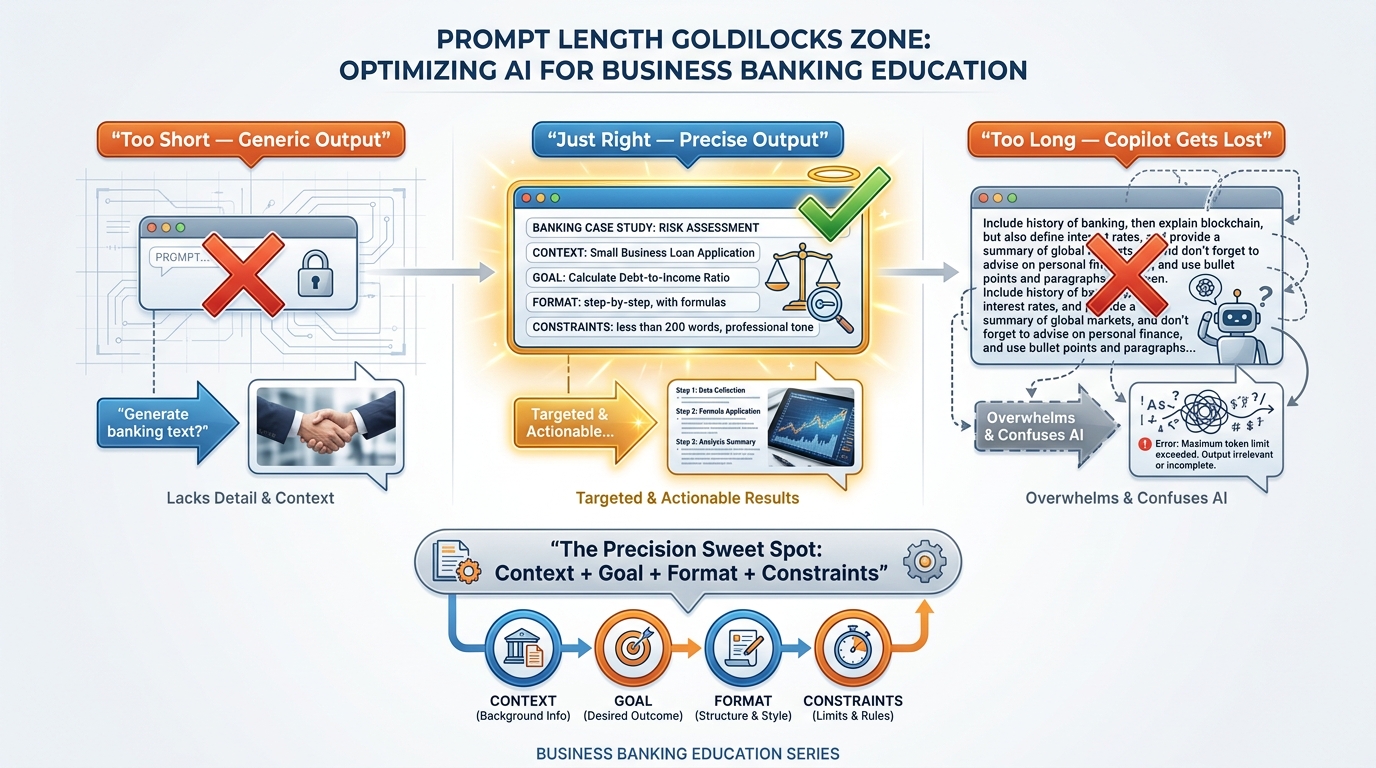
Figure 11:The Goldilocks Zone of prompt length — precision in four dimensions (Context, Goal, Format, Constraints) produces consistently better output than either minimal prompts or overly detailed instruction sets that obscure the actual request.
The “too short” failure mode:
“Write a memo about our Q2 commercial lending performance.”
This prompt has no context (who is reading it? what do they already know?), no specific goal (is this for leadership? compliance? the board?), no format guidance (length? tone? structure?), and no constraints (what should it include? what should it avoid?). Copilot will generate something. It will be polished. It will be almost entirely useless for your specific purpose, because it is optimized for the generic version of the task rather than your version.
The “too long” failure mode:
Some users, having learned that detail helps, overcompensate. They write prompts that are five paragraphs of background, instruction, counter-instruction, caveats, and competing requirements. At a certain level of complexity, this actually degrades output — the model gets pulled in multiple directions by conflicting guidance, and the result is incoherent or over-hedged.
The Goldilocks zone — the four-component prompt:
The research and practitioner experience on prompting converges on a consistent structure for most business tasks. A good prompt has four components:
Context: Who you are, what situation you’re in, what Copilot needs to know to frame its response appropriately
Goal: What you want Copilot to produce — specific, not vague
Format: How you want the output structured (bullet list, formal memo, executive summary, table, numbered recommendations, etc.)
Constraints: What to include, what to avoid, tone, length, any requirements that bound the output
These four components can usually be covered in three to five sentences, or a short paragraph. That is the sweet spot.
The BankUnited four-component prompt in action:
Context: I'm a commercial relationship manager at BankUnited preparing
for a renewal conversation with a \$15M commercial real estate client
who has been with the bank for eight years. Their portfolio has performed
well, but a competitor has approached them with a more aggressive rate.

Goal: Draft talking points for the renewal conversation that emphasize
our relationship history and service quality without immediately
conceding on rate.

Format: A bulleted list of five to seven talking points, each with
a one-sentence expansion.

Constraints: Keep the tone confident but not defensive. Do not include
any specific rate numbers or commitments — I'll handle those in the
room. The client is sophisticated and has heard every standard pitch before.
That prompt takes thirty seconds to write. The output it produces is immediately usable — not a generic draft that requires fifteen minutes of editing to make relevant.
A note on iterating:
You rarely need to get the perfect prompt on the first try. Copilot conversations are threaded — your follow-up messages have context from everything that came before. Think of prompting as a conversation: start with a good four-component prompt, review the output, and then refine with specific follow-up instructions. “That’s good — now make the tone more direct” or “Remove the second and fourth points and expand the third into two separate bullets” or “Rewrite this for a non-banker who doesn’t know our internal terminology.” The follow-up prompt is often where the real refinement happens.
1.77. Try This: Run the Same Banking Question Five Ways
Here is where the theory becomes practice. This exercise produces one of the clearest demonstrations of how much the technique matters — more than the question itself.
The baseline question:
“How should BankUnited approach a commercial real estate client who is approaching loan maturity during a period of elevated rates and declining collateral values?”
This is a real strategic question that any commercial lender or relationship manager at BankUnited might face. It is specific enough to be meaningful, general enough to work without confidential client data.
Run it five times — once with each technique:
Act as a veteran workout officer at a regional bank with 15 years
of experience managing distressed commercial real estate credits.
How should BankUnited approach a commercial real estate client
who is approaching loan maturity during a period of elevated rates
and declining collateral values?
What to notice: The response should have a notably more specific, risk-focused, and action-oriented character than a generic answer. It should reference specific workout strategies, forbearance considerations, and documentation practices.
Walk me through your reasoning step by step — considering
all the relevant factors, trade-offs, and bank interests —
before giving me a final recommendation on how BankUnited
should approach a commercial real estate client who is
approaching loan maturity during a period of elevated rates
and declining collateral values.
What to notice: The response should show its work — market context analysis, borrower position assessment, bank risk exposure, option evaluation — before landing on recommendations. The reasoning chain is the value.
Here are two examples of how our commercial team has handled
similar situations well:

Example 1 — Strong: [paste a real or hypothetical example
of a well-handled maturity extension negotiation]

Example 2 — Strong: [paste another strong example]

Now give me a recommendation for how BankUnited should approach
a commercial real estate client who is approaching loan maturity
during a period of elevated rates and declining collateral values.
Match the style and specificity of the strong examples.
What to notice: The output should mirror the structure and depth of your examples. If your examples were concise and action-oriented, the new output will be too.
I need a recommendation on how BankUnited should approach
a commercial real estate client who is approaching loan maturity
during a period of elevated rates and declining collateral values.
Before you give me an answer, ask me any questions you need
to give me the most useful possible recommendation.
What to notice: Copilot should ask about the specific client situation, loan size, collateral type, borrower relationship history, and bank appetite for extension vs. resolution. Your answers will produce a significantly more tailored recommendation.
Play the role of a skeptical senior credit officer who has
seen too many banks extend-and-pretend their way into
larger losses. I'm going to propose that we offer a
12-month maturity extension with a modified covenant
structure to a commercial real estate client approaching
maturity in a tough market. Push back hard. Tell me where
this approach is risky and what I'm not thinking about.

My proposal: We offer the extension at current market rate
plus a 50bps risk premium, with a requirement for a fresh
appraisal and a debt service coverage covenant of 1.15x.
If they can't meet DSCR at renewal, they agree to a
principal reduction plan.
What to notice: This output should be genuinely challenging. A good Sparring Partner response will identify risks like appraisal gaming, DSCR covenant enforceability, principal reduction mechanics, and the regulatory optics of the extension.
Compare the five outputs. They should be meaningfully different — not just in tone, but in substance, depth, and practical utility. That difference is what you’re learning to produce deliberately.
1.88. Putting It Together: Your First Week Prompting Plan
This course gives you the frameworks. What moves you from “I understand the techniques” to “I use them automatically” is repetition — applied to real BankUnited work, on real tasks, this week.
Here is a concrete five-day prompting plan:
Table 1:BankUnited First-Week Prompting Plan
Day | Technique | Task to Try at BankUnited |
|---|---|---|
Monday | Role-Based Prompting | Assign a relevant professional role and use it to analyze a document or memo you’re currently working on |
Tuesday | Chain-of-Thought | Use Copilot to reason through a decision or recommendation you need to make this week — ask for the step-by-step reasoning before the conclusion |
Wednesday | Few-Shot | Pull two or three examples of a document type your team produces regularly, and ask Copilot to generate a new one in the same style |
Thursday | Reverse Prompting | Let Copilot interview you for a presentation or proposal you need to develop — answer its questions, then review the output |
Friday | Sparring Partner | Present one of your current ideas or recommendations to Copilot in the Sparring Partner mode and see what comes back |
By Friday, you will have hands-on experience with all five techniques applied to real work. That is more practical prompting practice than most Copilot users accumulate in their first three months.
1.99. Productive Struggle Problem
You are a senior relationship manager at BankUnited. Your most important portfolio client — a $22M commercial real estate borrower with six properties across South Florida — has just informed you that a competitor bank is offering to refinance their entire portfolio, claiming it can save them $180,000 annually in interest costs.
You have thirty minutes before the client calls to discuss. You need: a clear understanding of whether the competitor’s claim is plausible, a retention strategy that does not simply concede on rate, and talking points that draw on the eight-year relationship history.
You have access to Microsoft 365 Copilot and the five techniques from this chapter.
The challenge: Design a sequence of Copilot prompts — using at least three of the five techniques — that you would actually run in the next twenty-five minutes to prepare for this call. Write out each prompt in full, explain which technique it uses and why you chose it for that step, and describe what you expect from each output.
There is no single right answer. There are better and worse sequences, and the quality of your thinking about why you’re choosing each technique is as important as the prompt itself.
1.10Discussion
Prompting as a Professional Skill
The five techniques in this chapter are not software features — they are communication frameworks that work because of how language models process context. As Microsoft continues to evolve Microsoft 365 Copilot, the specific mechanics will change. The principles will not.
Consider: In what ways does prompting Copilot resemble briefing a highly capable junior colleague? In what ways does it differ? What does that comparison reveal about where human judgment remains irreplaceable in the AI-assisted workflow?
Discussion Guidelines:
Your response should engage substantively with the comparison between prompting AI and briefing a human colleague. Include at least one specific example from your own professional experience — either an experience where clear communication dramatically improved a colleague’s output, or a case where a vague request produced work that missed the mark entirely. Apply that experience to what you’ve learned about prompting.
Support your perspective with at least one credible source — this might be something from the Microsoft 365 Copilot official documentation, the Skilling Center resources at adoption
After posting your response, engage with at least two classmates by extending or challenging a specific claim they made — not just affirming it. “I agree because...” is not a sufficient peer response. “I’d push back on your claim that X because I’ve seen Y, which suggests Z” is.
Do not summarize or repeat what you read. Share what you think — grounded in evidence — about what this means for how BankUnited professionals should work going forward.
1.11Glossary
Microsoft 365 Copilot The paid, enterprise-grade AI assistant available through BankUnited’s Microsoft 365 license. Unlike Copilot Chat, M365 Copilot connects to your organizational data via Microsoft Graph and operates within your M365 security boundary.
Copilot Chat
The free, general-purpose AI assistant available at copilot
Microsoft Graph The intelligence layer within Microsoft 365 that maps organizational data — emails, meetings, chats, calendar events, files, and shared documents. Copilot uses Microsoft Graph to ground its responses in your actual work context.
Grounding The process by which Microsoft 365 Copilot accesses Microsoft Graph to retrieve relevant organizational context before generating a response. Grounding is what makes Copilot responses personalized to your actual work rather than generic.
Copilot Agent A purpose-built AI assistant configured for a specific workflow, knowledge base, or organizational function. More specialized than the general M365 Copilot experience; configured through Microsoft Copilot Studio.
m365.cloud.microsoft The unified web portal for Microsoft 365 Copilot — the “front door” that provides access to all M365 Copilot capabilities, the Prompt Gallery, and connected M365 apps from a single authenticated session.
Microsoft 365 Copilot Search A universal search capability within the M365 Copilot experience that searches across all connected M365 apps (Outlook, SharePoint, Teams, OneDrive) and third-party data in a single query.
Role-Based Prompting A prompting technique that assigns a specific professional identity or perspective to Copilot before making a request, shifting the analytical frame, vocabulary, and focus of the output.
Chain-of-Thought Reasoning A prompting technique that asks Copilot to show its reasoning step-by-step before giving a final answer, producing more transparent, coherent, and auditable analytical output.
Few-Shot Prompting A prompting technique that provides Copilot with a small set of high-quality examples before asking it to produce new output — teaching by demonstration rather than by description.
Reverse Prompting A prompting technique that inverts the standard dynamic by asking Copilot to interview you with clarifying questions before producing output, ensuring the request is well-understood before work begins.
Sparring Partner A prompting technique that assigns Copilot the role of a skeptical, critical counterpart who pushes back on your ideas — used to pressure-test thinking before high-stakes conversations.
Goldilocks Zone The optimal prompt length and specificity for a given task — precise enough to produce relevant output, concise enough to avoid confusing or overloading the model. Typically achieved with the four-component prompt structure: Context, Goal, Format, Constraints.
Four-Component Prompt A prompting structure with four elements — Context, Goal, Format, and Constraints — that consistently produces more useful output than vague or overly complex prompts.
Prompt Gallery Microsoft’s official curated library of tested, verified prompts organized by job function and application. Available at m365.cloud.microsoft/copilot-prompts.
Copilot Skilling Center
Microsoft’s official learning hub for Microsoft 365 Copilot, with structured learning paths and role-specific guidance. Available at adoption
Permission Scoping The architectural principle that Microsoft 365 Copilot only surfaces information the signed-in user already has permission to access — ensuring Copilot cannot bypass existing security and compliance controls.
1.12Leader’s Takeaway
Microsoft 365 Copilot is not a feature you turn on. It is a capability you develop — in yourself, and in your team.
The infrastructure is in place. The security architecture is sound. The intelligence layer that grounds Copilot in your organizational context is active. The tools are available at m365.cloud.microsoft right now.
What remains is the skill — specifically, the prompting skill that determines whether Copilot becomes a transformative part of how BankUnited works or sits as an underutilized line item in the software budget.
The five techniques in this chapter are not exotic. They are communication principles applied to a new kind of tool. Role-Based Prompting is how you brief a specialist. Chain-of-Thought is how you ask for a memo, not just a verdict. Few-Shot is how you onboard a new analyst with examples. Reverse Prompting is how you let the expert interview you before the work begins. The Sparring Partner is how you moot-court your best thinking before the real conversation.
These techniques are learnable. They improve with repetition. And the professionals on your team who develop fluency with them fastest will not just be more productive individually — they will become the informal teachers who spread that capability to everyone around them.
That is the compound return on investing in this skill. It is not linear — it multiplies.