1Chapter 1: The Essentials
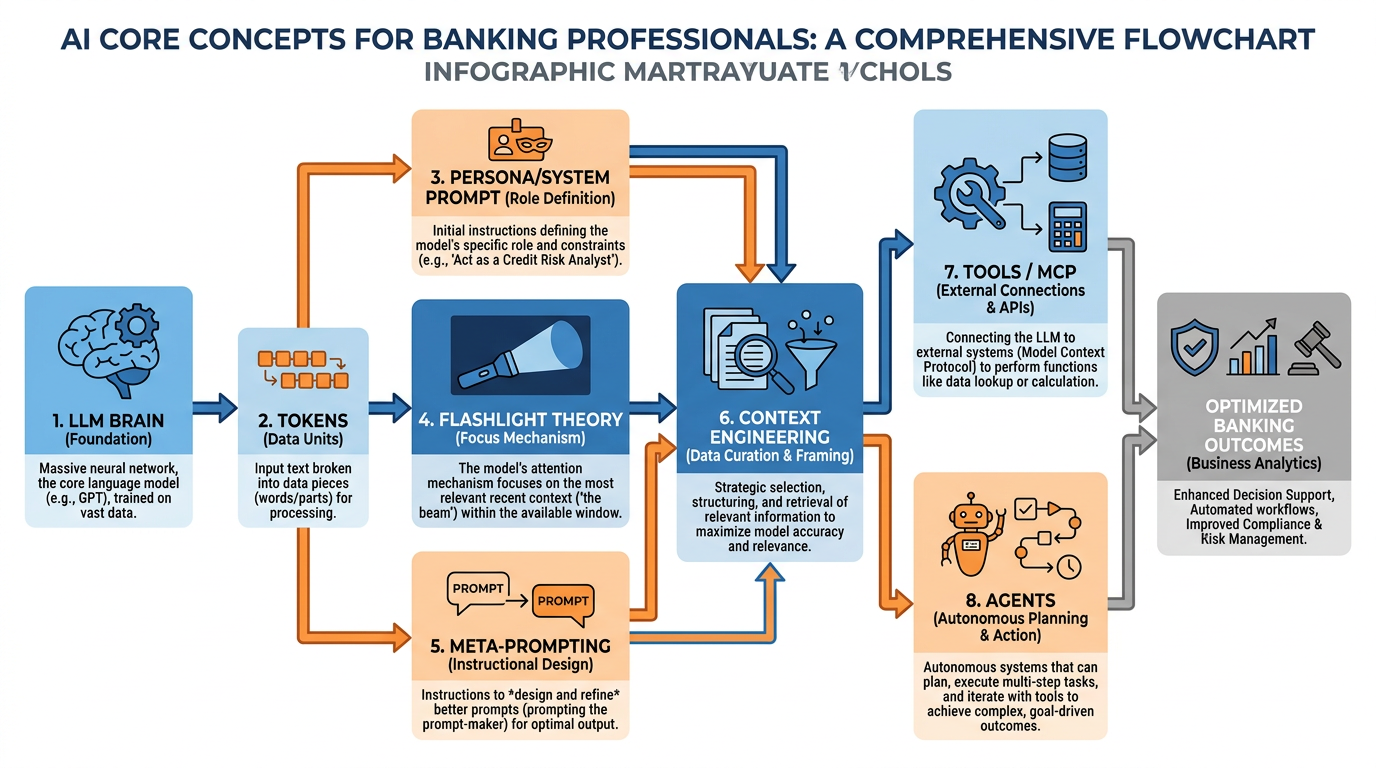
Figure 1:Your AI foundations map — seven concepts that unlock everything. Master these and you master the tool.
“You don’t need to understand how the engine works to drive a Ferrari. But you do need to know what gear you’re in.”
There is a particular kind of frustration that professionals experience with AI. They try it once. It gives a vague, generic answer. They think, this thing is overhyped. And they go back to doing things the slow way.
What they don’t realize is that they handed the Ferrari’s keys to a blindfolded driver and then complained that it didn’t go anywhere interesting.
Everything in this chapter exists to prevent that experience. By the time you finish here, you will understand exactly why AI gives the answers it does, how to change those answers profoundly, and how to build a system that works for you automatically. We are going to cover seven ideas. Each one is a gear. Together, they constitute the complete operating system for working with AI at a professional level.
1.1The Brain: Understanding the Large Language Model
Let’s start with the most important question: What is an AI model, really?
Strip away the marketing language and the science fiction associations. Here is what you need to know: a Large Language Model is, in its purest form, a very large, very fast pattern-matching machine trained on an almost incomprehensible amount of human text. Books, scientific papers, legal documents, websites, codebases, financial reports, conversations — essentially, a significant portion of everything human beings have ever written down.
The result of all that training is something that functions, for practical purposes, like an extraordinarily high IQ mind that has read everything. Not memorized, exactly — it does not have a database of facts it looks up. It has learned patterns — the deep structural relationships between ideas, concepts, words, and reasoning steps across virtually every field of human knowledge.
Think of it this way: the LLM is the brain. It is pure IQ.
This is not a metaphor designed to make you comfortable. It is the most accurate way to understand what you are working with. When you ask Copilot a question, you are putting a question to something with genuine, broad intellectual capability — capability that rivals or exceeds the best-read person you have ever met, across almost every domain.
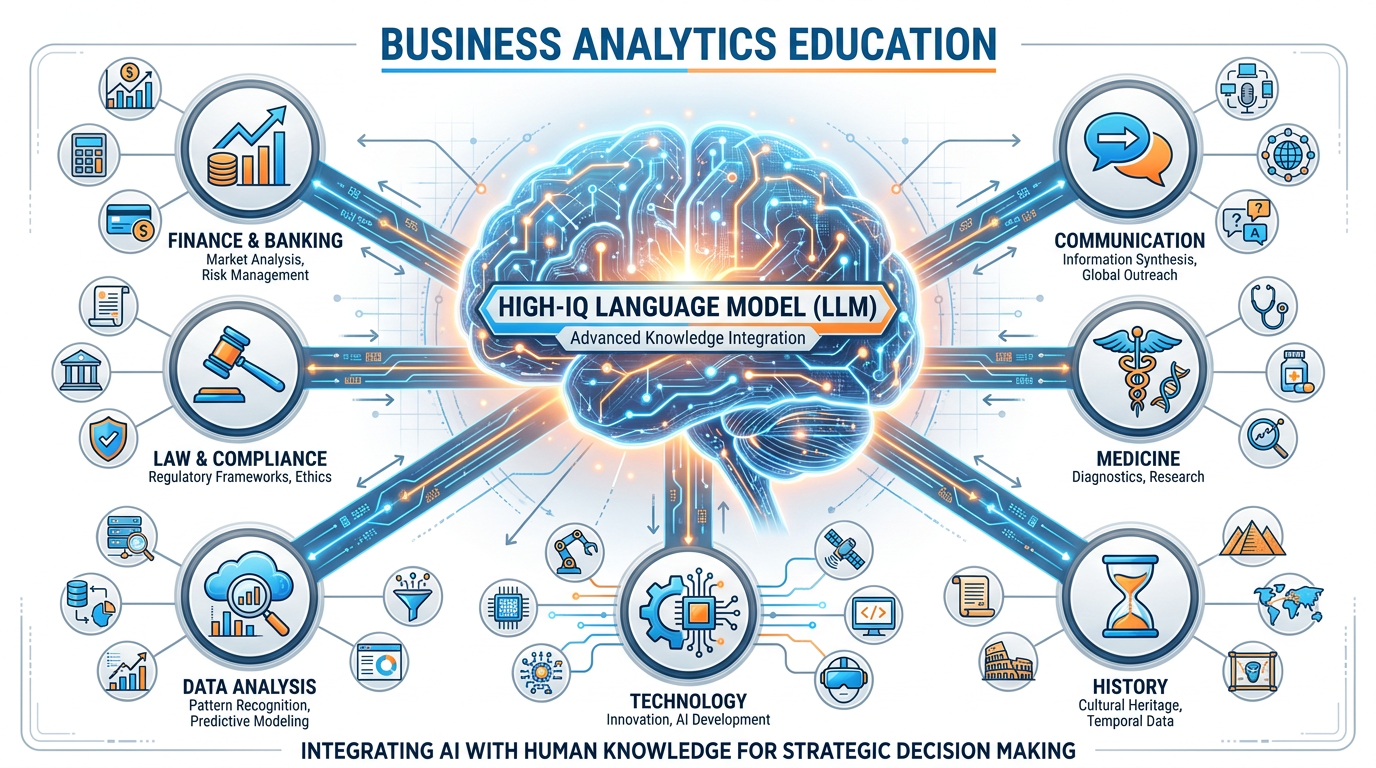
Figure 2:The LLM is the brain. It is pure IQ — broad, deep, and available to you right now.
Don’t take our word for it. Try this:
But here is the critical caveat that will define everything that follows: raw IQ, without context, is useless.
1.2Tokens: The Atoms of AI Language
Before we talk about context, we need to briefly understand how AI “reads” and “thinks.” The unit of operation is not the word — it is the token.
A token is roughly the smallest chunk of meaning the AI processes. Words get split into tokens. “BankUnited” might be two tokens: “Bank” and “United.” The word “compliance” might be a single token. The word “antidisestablishmentarianism” might be six tokens. Common short words are often single tokens; rare or long words get subdivided.
Here is why this matters to you as a business professional: everything in AI — the cost of the API call, the limits of what you can input, the speed of the response — is measured in tokens. When your IT department says Copilot has a “context window” of a certain size, they are talking about tokens. When you upload a document to Copilot, it is converted to tokens before the AI reads it.
Understanding tokens is not just a curiosity. It directly connects to one of the most important concepts in this entire book.
1.3Token Economics: The Cost of Thinking
Every time you send a message to Copilot, tokens go in (your prompt) and tokens come out (the response). In enterprise deployments like BankUnited’s Microsoft 365, this is handled at scale across thousands of users.
Token economics refers to the practical implications of this:
Longer inputs cost more (in compute, and in some licensing models, in dollars)
More focused prompts get better results — because you’re using your token “budget” efficiently
Large documents uploaded to Copilot are chunked and tokenized before being read
For you as a practitioner, the lesson is precision: a well-crafted 50-word prompt will almost always outperform a rambling 500-word prompt. You are not chatting with a friend who needs emotional context. You are allocating cognitive resources. Be specific. Be clear. The AI will do more with less when you speak precisely.
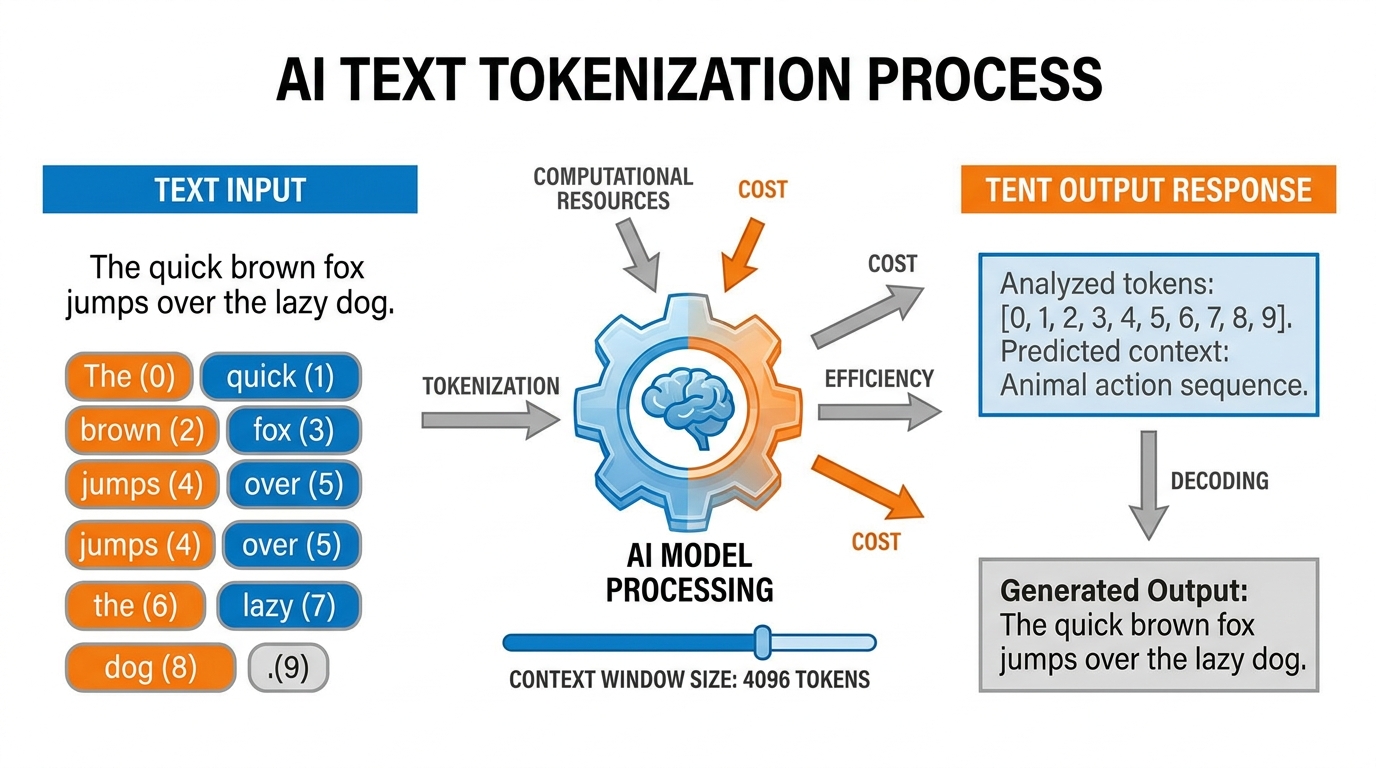
Figure 3:Tokens in, intelligence out. Understanding token economics makes you a more efficient and effective AI user.
1.4Context Engineering: The Flashlight in the Dark Room
Now we arrive at the concept that will transform your relationship with AI more than any other. It is called context engineering, and it is the essential skill of the AI era.
Here is the most important analogy in this entire book. Read it slowly.
Imagine you have hired the most brilliant consultant in the world. This person has a PhD from every major university, has read every book, has advised Fortune 500 companies, and has a flawless track record. You bring them into your building. But when they arrive, you put them in a completely dark room — no windows, no lights, no documents, nothing.
You then lean in through a slot in the door and ask: “What should we do about our commercial lending pipeline?”
They can’t answer. Not because they aren’t brilliant. Because they can’t see anything. They have all the IQ in the world, but zero information about your world. The result is a generic answer that could apply to any bank anywhere. Useless.
Now you hand them a flashlight. You shine it at a section of the room — and in that section, you have placed your Q3 lending data, your client pipeline reports, your team’s capacity analysis, and the regulatory guidelines relevant to your situation.
Now they can answer. And the answer they give is extraordinary — because it combines world-class intelligence with specific, relevant context.
The flashlight is the context. The AI is the IQ. Context engineering is the art of knowing what to put in the flashlight beam.
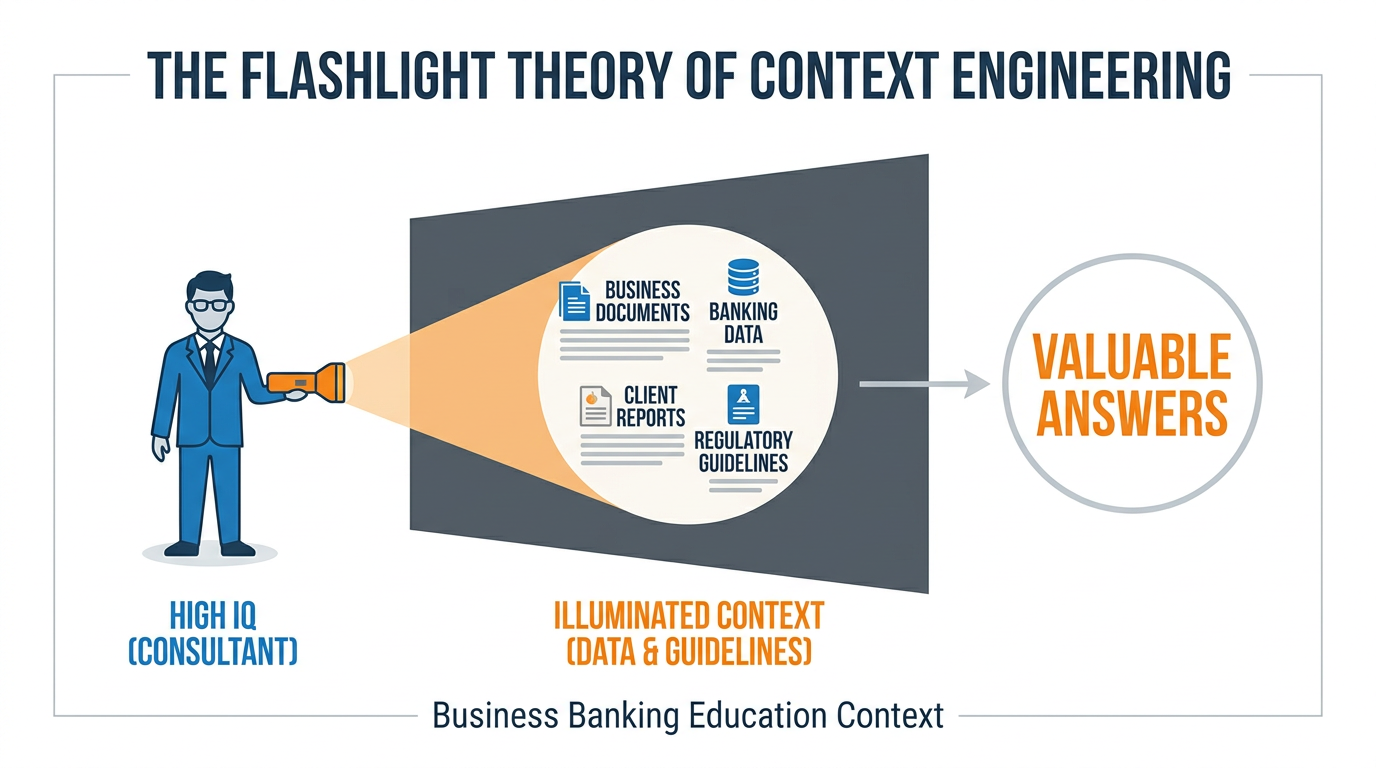
Figure 4:The Flashlight Theory of Context Engineering. Your job is not to use AI — it is to illuminate the right information with the right light.
1.4.1Context Rot: When Your Flashlight Gets Stale
There is a phenomenon called context rot that every serious AI practitioner needs to understand.
Imagine you are in a long conversation with Copilot — 40 exchanges deep, across the span of an hour. The early messages in that conversation were highly relevant and rich. But as the conversation grew, the AI had to start “forgetting” the earliest parts of the conversation because they no longer fit in its active memory. Meanwhile, the conversation has meandered — you’ve asked tangential questions, gotten distracted, covered tangents.
The result is that the context the AI is currently working with is a degraded version of what you started with. Critical early instructions have faded. The richness of your initial setup has been diluted by the noise of everything that came after. You are getting less useful answers not because the AI got worse, but because its flashlight is now full of unimportant things and the useful documents have slipped out the back.
The fix is simple: For important work sessions, start fresh. Provide your context at the top of a new conversation. Don’t rely on continuity from a long prior exchange. Fresh context in, sharp output out.
1.4.2The Context Window: Your AI’s Working Memory
The context window is the total amount of information — measured in tokens — that the AI can hold in its “attention” at one time. Think of it as the size of the room the flashlight can illuminate. Modern frontier models have context windows ranging from 128,000 to over 1,000,000 tokens — enough to hold entire books, lengthy legal documents, or many hours of meeting transcripts.
Microsoft Copilot’s context window for enterprise users is substantial and continues to expand. For practical purposes, you can upload full reports, multi-page proposals, and extensive email threads. The AI will read all of it.
But remember: bigger context window ≠ better focus. You want to give the AI the right context, not the most context. A precise flashlight beats a floodlight when you know what you’re looking for.
1.5The Persona: Your AI’s Identity and Instructions
Here is a question: if you hired that genius consultant and put them in your building, would you just set them loose with no briefing? Of course not. You would tell them: “Here is who you are in this context. Here is your role. Here is how I want you to communicate. Here are the constraints you must operate within.”
In AI, this is called the persona — or more technically, the system prompt. It is the foundational instruction set that defines how the AI behaves before you ask it a single question.
A well-crafted persona can transform your AI from a generic assistant into something that feels like a specialized expert built specifically for your role.
In Microsoft 365 Copilot, you define your persona at:
m365
This is where you tell your Copilot: who it is, what it knows about you, how it should respond, what tone to use, what it should prioritize. The AI will carry these instructions into every interaction.
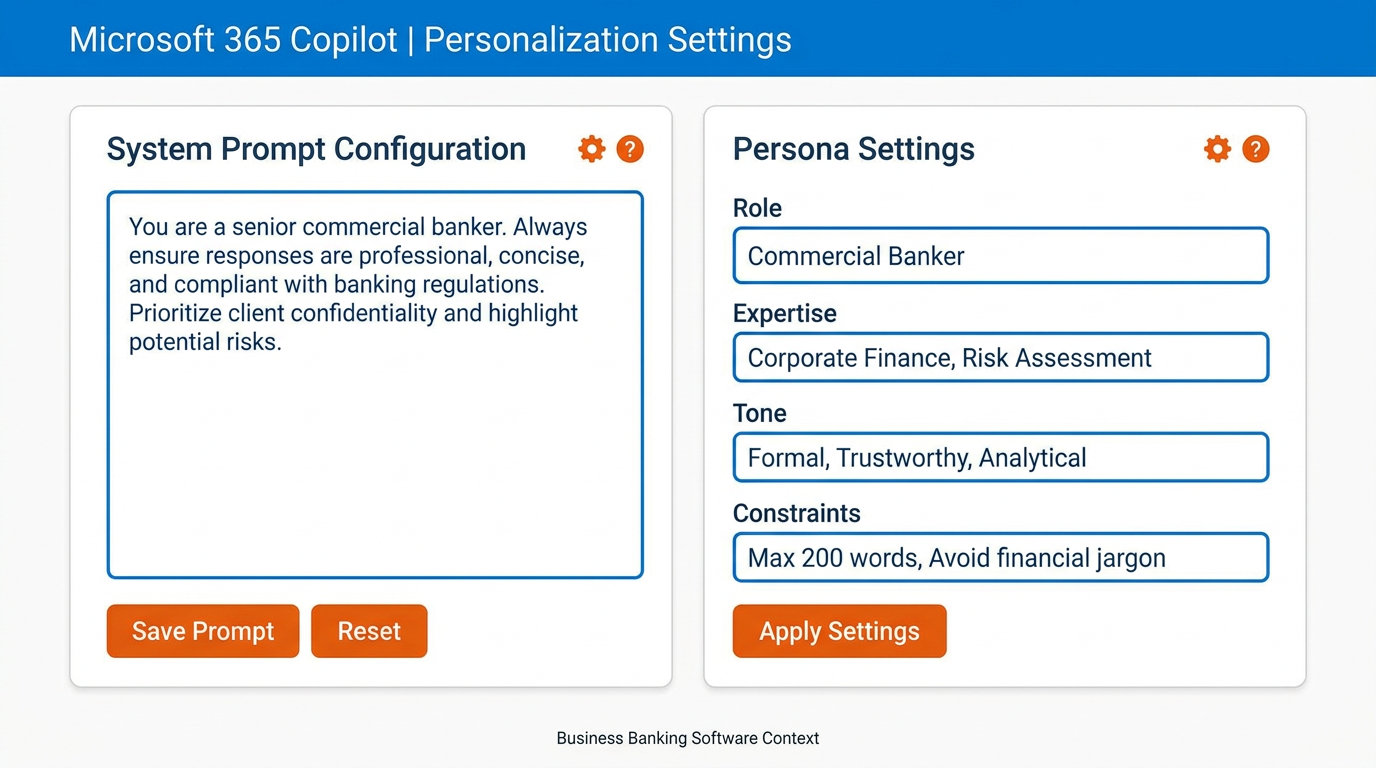
Figure 5:Your Copilot persona lives in Settings → Personalization. This is the single most impactful 5-minute setup you will do in this entire course.
Example persona for a commercial banker at BankUnited:
You are a senior commercial banking expert with 20 years of experience
in South Florida's financial services market. You understand relationship
banking, commercial real estate lending, and treasury management deeply.
When I ask you questions, respond with the precision of a senior
practitioner, not a generalist. Use clear, direct language. When I ask
for analysis, give me a recommendation, not just a summary. Always
flag any compliance or regulatory considerations relevant to banking
operations. My name is [Name] and I work in [Department] at BankUnited.
With this persona in place, every conversation starts with a fundamentally different AI than the generic one that everyone else is using. You have built your own senior advisor.
1.6Meta-Prompting: Teaching Yourself Through AI
We need to talk about the most powerful skill in this entire book. It is called meta-prompting, and once you understand it, you will never interact with AI — or with information in general — the same way again.
Here is the insight: AI doesn’t just answer questions. It can simulate expertise you don’t yet have.
The standard approach to using AI is: I have a question, I ask the AI, I get the answer. That’s useful. But it keeps you in the position of someone asking for answers.
Meta-prompting inverts the relationship. Instead of asking the AI what you already want to know, you ask it: “From the perspective of an expert in X, what are the most important questions I should be asking about Y? What am I probably missing? What are the blind spots that non-experts in this field consistently have?”
Let’s make this concrete for BankUnited professionals.
This is meta-prompting. And its implications are staggering.
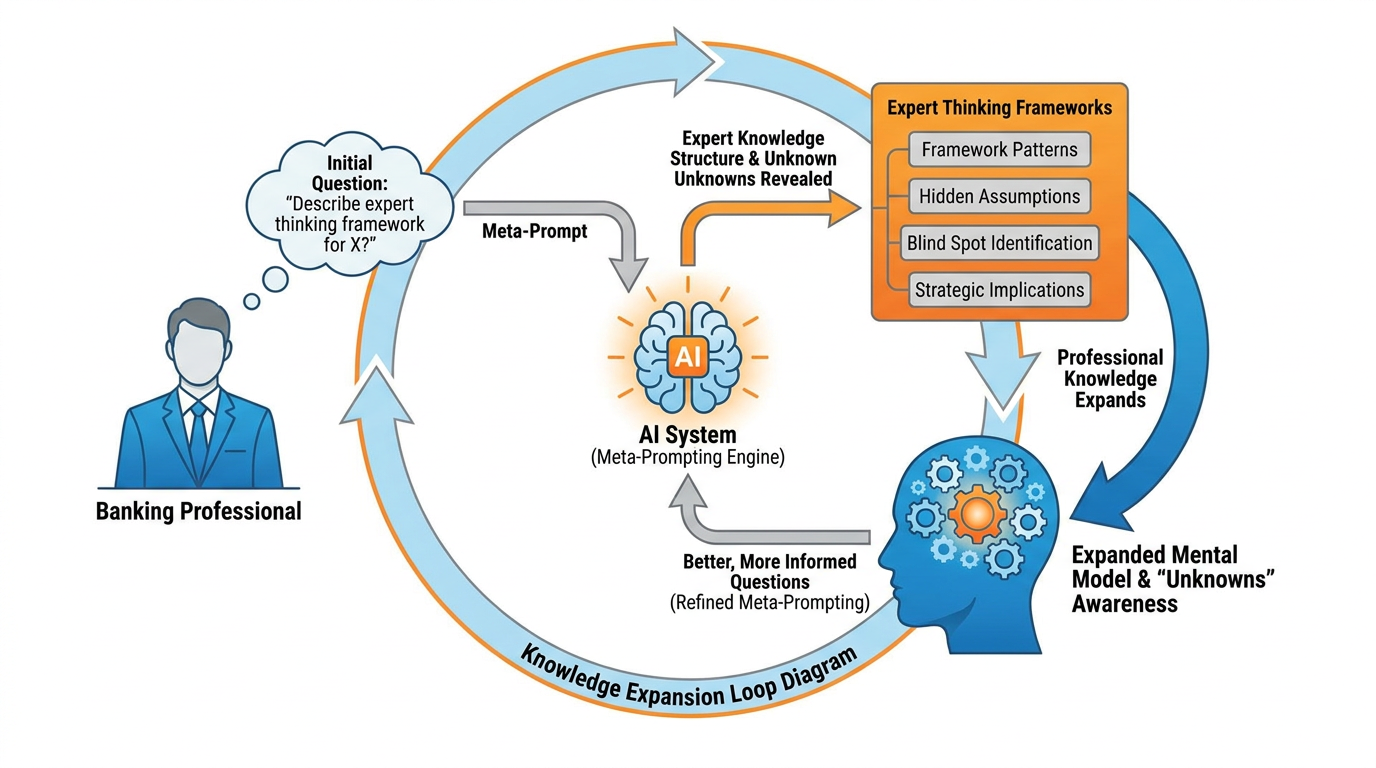
Figure 6:Meta-prompting doesn’t just answer your questions — it reveals the questions you didn’t know to ask. This is how you 10x your cognitive range.
The deepest application of meta-prompting is self-directed learning. Any time you encounter a domain where you are not an expert — regulatory changes, new financial instruments, emerging market conditions, a client’s industry — you can use meta-prompting to rapidly acquire the frame of expert thinking in that domain. You don’t outsource your thinking. You expand it.
This is how you 10x your capabilities without becoming someone else. You remain yourself, with all your judgment and experience — but now your range of knowledge extends wherever you need it to go.
1.7Your Voice Is Your Superpower: Wispr Flow and Super Whisper
Before we go further, we want to pause and introduce something that sounds simple but makes a profound difference in practice.
Change your relationship with AI. Start talking to it.
Right now, most people interact with AI by typing. They sit at a keyboard, laboriously craft a prompt word by word, and send it off. The result is often a shorter, less nuanced, less contextual prompt than what the person actually needed — because typing is slow and tedious and we abbreviate when we’re tired.
There is a better way.
Wispr Flow (wispr.flow) and Super Whisper (superwhisper.app) are tools that let you speak to your computer’s text fields — including the Copilot chat box — in natural speech. You think out loud, the tool transcribes, and your fully-formed thoughts appear as text prompts. No keyboard lag. No abbreviation. No loss of nuance.
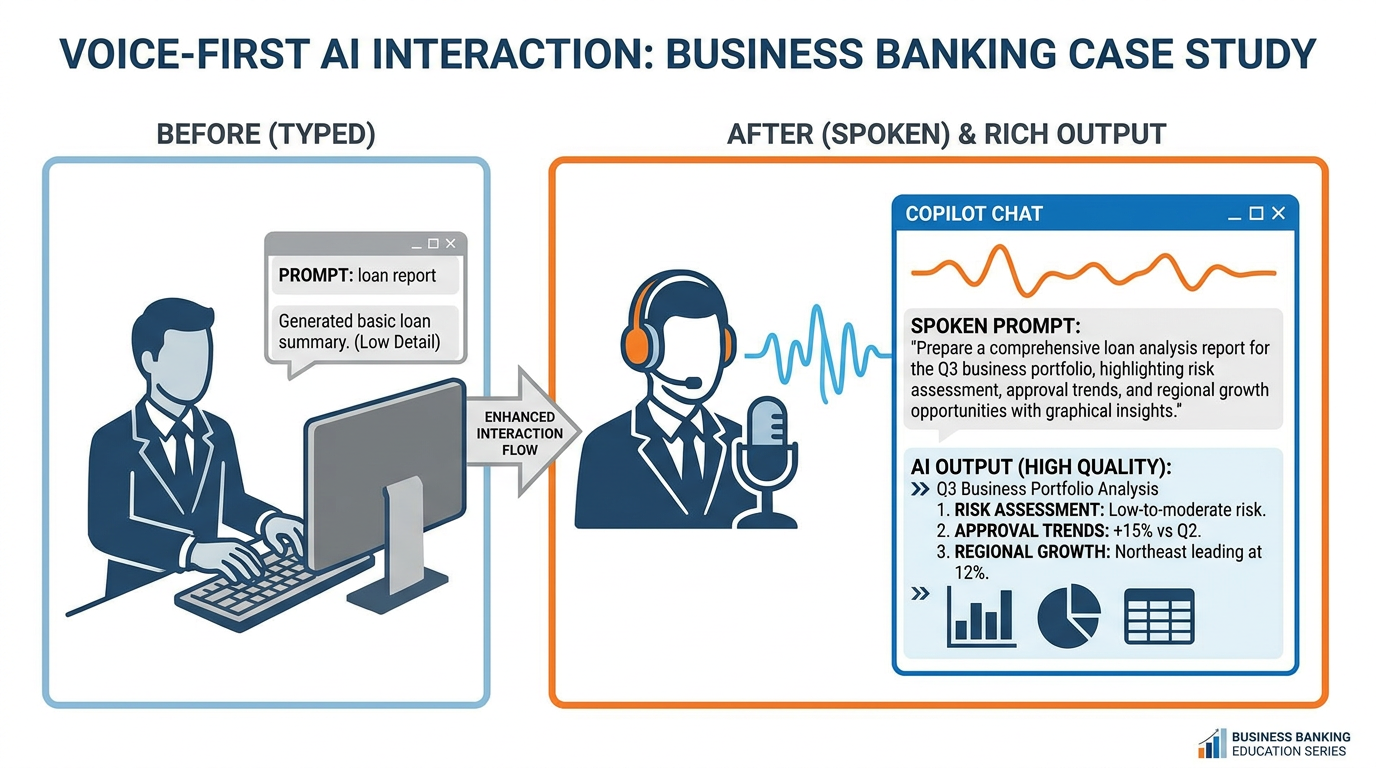
Figure 7:Voice-first AI interaction removes the friction of typing and unlocks your natural communication intelligence. Your spoken prompts are richer, more detailed, and more contextual than typed ones.
People who adopt voice-first AI interaction report that the quality of their AI outputs increases dramatically. The reason is structural: humans speak at roughly 150 words per minute but type at only 40. When you speak, you provide more context, more nuance, more of the why behind your question — and the AI has so much more to work with.
1.8Tools: Your Data Is Already Connected
Here is something that surprises most people when they learn it.
Copilot doesn’t just have the LLM brain. It already knows about your email. Your calendar. Your documents. Your Teams conversations. Your SharePoint files. The moment you started using Microsoft 365 Copilot, all of those data sources were connected.
To understand why this matters, let’s return to the Flashlight Theory. We said that the context is what makes the IQ valuable. The challenge, normally, is getting your context into the AI’s flashlight beam. With most AI tools, you have to manually copy and paste your data, upload documents, and remind the AI who you are every time.
Microsoft solved this problem. They built the data connections — the technical bridges between the AI and your business data — directly into Copilot. In the AI world, these bridges are called MCP Servers (Model Context Protocol Servers). They are the technical standard for connecting tools and data sources to AI models.
You don’t need to set any of this up. It is already done.
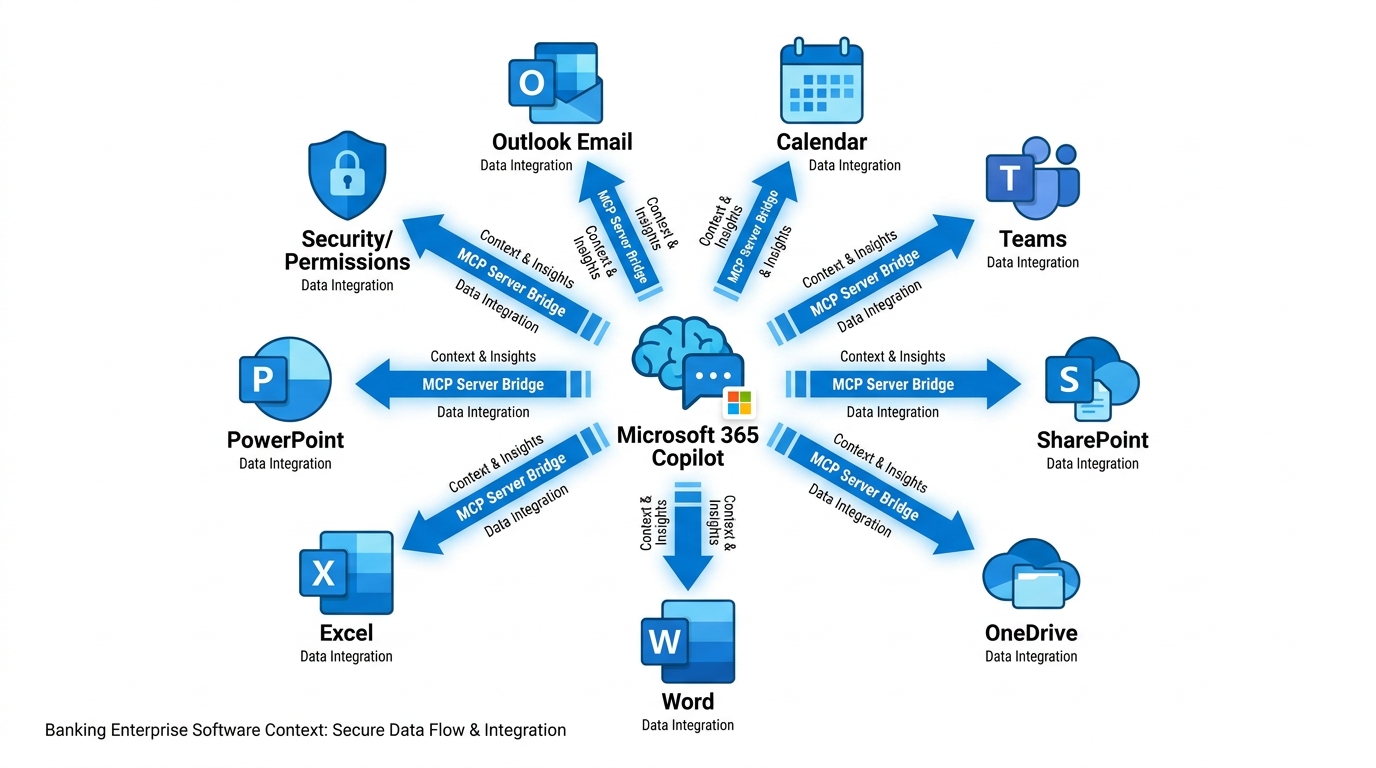
Figure 8:Your Copilot is already connected to your business world. Email, calendar, documents, chats — all inside the flashlight beam.
1.9Agents: Your First Synthetic Employee
We have arrived at the most powerful idea in this chapter, and arguably in this entire book. It is the idea that will define competitive advantage in banking for the next decade.
An agent is a synthetic employee.
Not a chatbot. Not a search tool. An employee — one that you configure, train, and deploy to handle a repeatable set of tasks.
Here is the conceptual leap: we go from prompts (you ask a question, you get an answer) to systems (a configured AI that handles a class of work automatically, without you re-explaining everything every time).
A Copilot agent is built from four components:
card-carousel - Unknown Directive
card-carousel - Unknown Directive:::{card} 🧠 Persona
The system prompt — who is this agent, what is its role, how should it respond, what constraints must it operate within?
:::
:::{card} 📁 Knowledge
Files, documents, websites, meeting transcripts, and databases that the agent uses as its source of truth.
:::
:::{card} 🔧 Tools
The connections it can make — can it search the web? Access SharePoint? Query a database? Create documents?
:::
:::{card} 📋 Instructions
The operating procedure — how does it handle edge cases, escalations, and situations outside its knowledge?
:::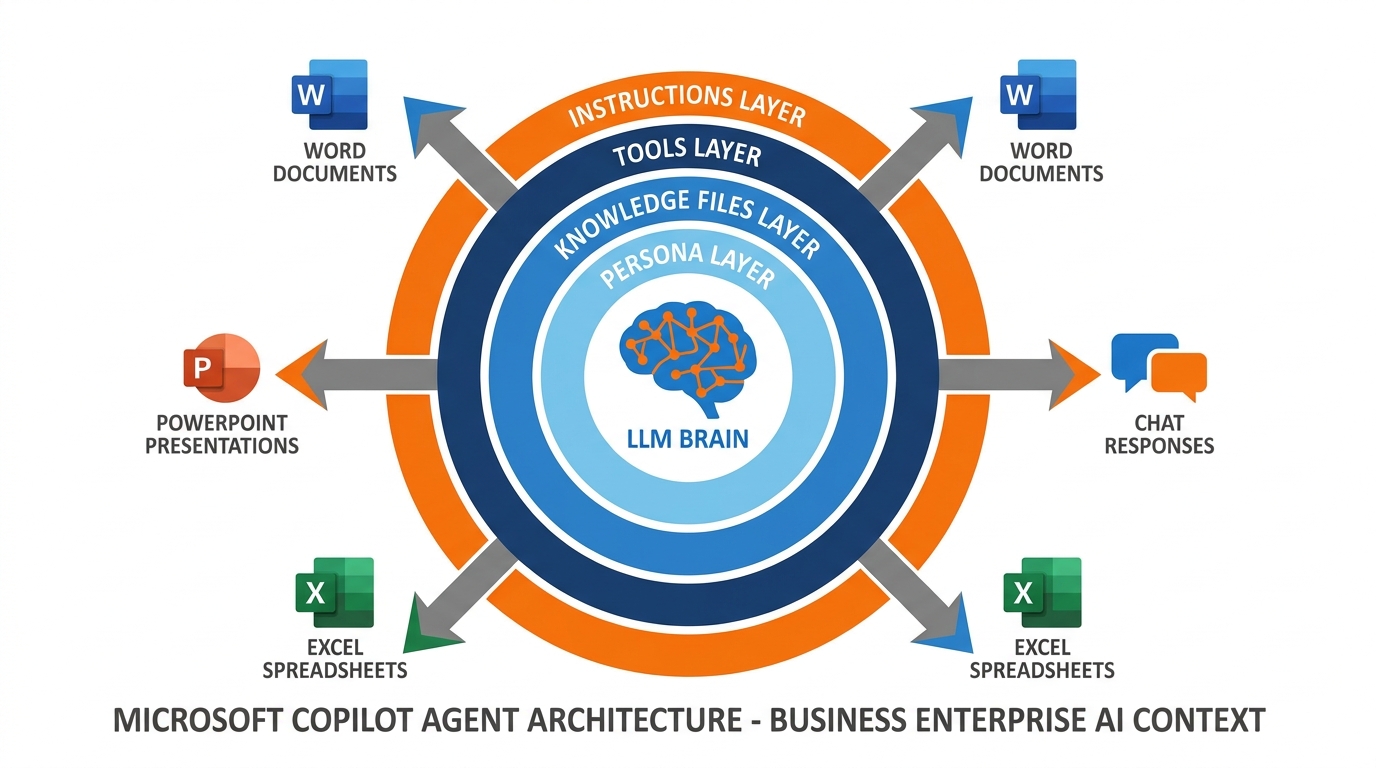
Figure 9:An agent is a system, not a prompt. Persona + Knowledge + Tools + Instructions = your first synthetic employee.
To create an agent in Microsoft 365 Copilot, you go to m365.cloud.microsoft, click New Agent, and configure it:
Name and description — what this agent does
Instructions — the persona and operating procedures (this is your system prompt)
Knowledge — add files, websites, SharePoint links, meeting recordings, org charts
Output capabilities — enable it to create Word documents, Excel reports, PowerPoint presentations, or generate images
Web access — let it search the open web, or restrict it to only your specified sources
The agent you build will be available to you (and, if you choose, your team) as a named Copilot experience. Instead of crafting a new prompt every time you need the same type of work done, you simply open the agent and talk to it.
This is the moment we go from using AI to deploying AI.
1.10The Seven Concepts: Your Master Reference
Before we close Chapter 1, let’s anchor all seven concepts you’ve just learned in a single summary you can return to:
Table 1:Your AI Foundations — The Seven Essentials
Concept | What It Is | Why It Matters |
|---|---|---|
The LLM (Brain) | A neural network trained on vast human knowledge — pure IQ | The engine behind Copilot’s intelligence |
Token | The atomic unit of AI processing (~¾ of a word) | Determines cost, speed, and context limits |
Token Economics | The relationship between token usage and value/cost | Drives better, more precise prompting habits |
Context Engineering | The art of putting the right information in the AI’s “flashlight” | The primary determinant of output quality |
Context Window | The total tokens the AI can hold in active attention | Defines how much data you can give Copilot at once |
Persona / System Prompt | Foundational instructions that shape AI behavior | Turns a generic assistant into your specialized expert |
Meta-Prompting | Using AI to reveal expert thinking and unknown unknowns | The highest-leverage cognitive skill of the AI era |
Tools / MCP Servers | Data connections between the AI and your business systems | Already configured in Microsoft 365 — your data is live |
Agents | Configured AI systems that handle repeatable work | Your first synthetic employees — from prompts to systems |
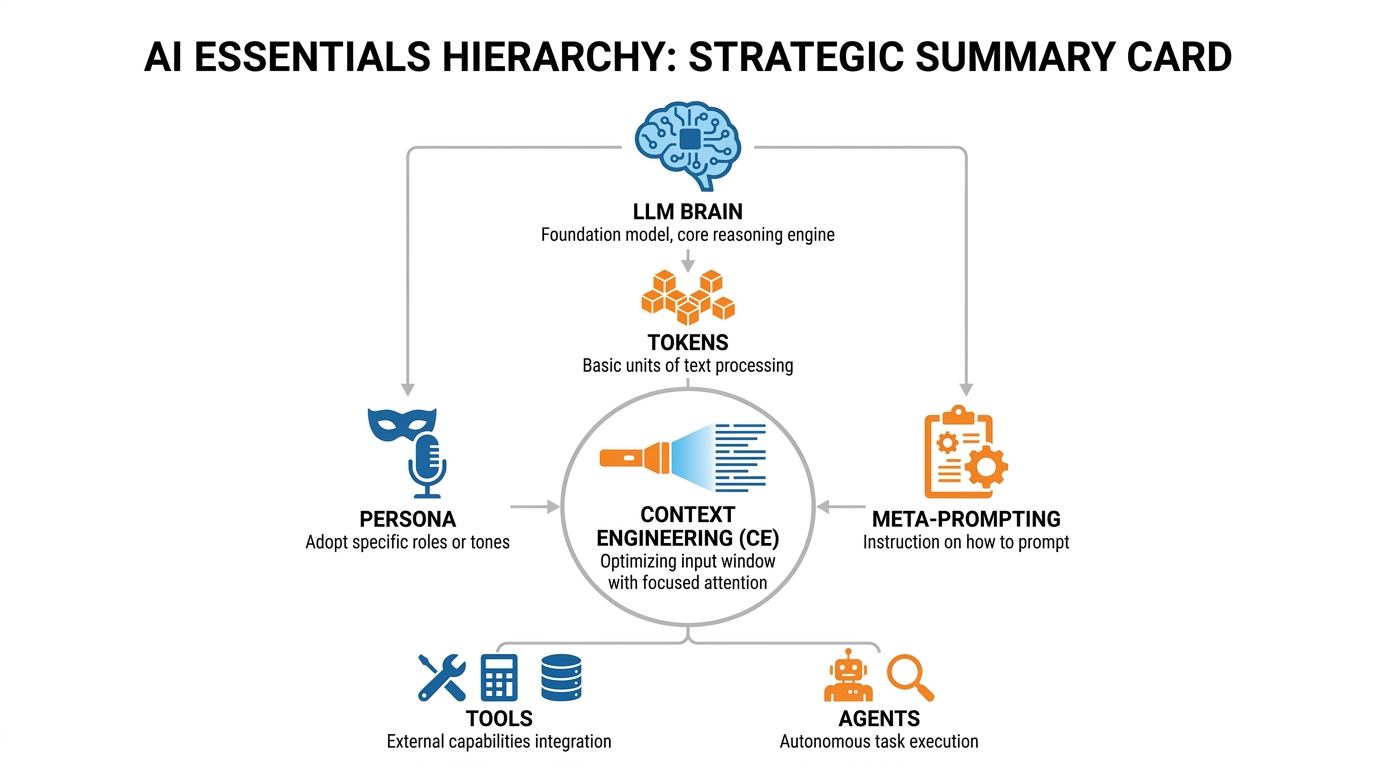
Figure 10:The seven essentials form a complete system. Each concept builds on the previous one — from raw IQ to deployed synthetic employees.
1.11Glossary
Large Language Model (LLM) A neural network trained on massive text corpora that generates human-like text by predicting the most contextually appropriate next tokens. The cognitive engine behind Copilot.
Token The atomic unit of text that an AI processes — approximately ¾ of an average English word. All AI costs, limits, and speeds are denominated in tokens.
Context Window The maximum number of tokens an AI can process in a single interaction — its active “working memory.” Modern frontier models support 128,000 to 1,000,000+ tokens.
Context Engineering The practice of deliberately curating and structuring the information provided to an AI to maximize the quality and relevance of its outputs.
Context Rot The degradation of context quality that occurs during long AI conversations as early, relevant instructions are displaced by newer, less relevant content.
Persona (System Prompt) The foundational instruction set given to an AI that defines its role, tone, expertise, and behavioral constraints — set before any user messages.
Meta-Prompting The practice of asking AI to reveal expert thinking frameworks, unknown unknowns, and structural knowledge about a domain, rather than simply answering a specific question.
MCP Server (Model Context Protocol) The technical standard for connecting data sources and tools to AI models. Microsoft has pre-configured MCP connections between Copilot and all Microsoft 365 services.
Agent A configured AI system combining a persona, knowledge base, tools, and instructions to handle a repeatable class of tasks — a synthetic employee.
Token Economics The relationship between token consumption, cost, and value — the principle that precise, well-structured prompts outperform verbose, unfocused ones.
Copilot Studio The Microsoft 365 interface for creating, configuring, and deploying custom AI agents within an organization’s Copilot environment.
Permission Inheritance The security principle by which Copilot agents respect existing Microsoft 365 access controls — the AI can only access data that the user themselves can access.
Wispr Flow A voice dictation tool that transcribes spoken language into text in real time across any application, enabling voice-first AI interaction.
Super Whisper A macOS voice transcription tool that converts speech to text across any text field, optimized for natural, conversational AI prompting.
1.12Chapter Summary
You began this chapter knowing that AI is important. You end it knowing why — and more crucially, you know how to use it with precision and purpose.
The Large Language Model is pure IQ — extraordinarily capable, trained on the sum of human knowledge, and available to you through Microsoft 365 Copilot right now. But IQ without context is wasted. Context engineering — the art of putting the right information in the AI’s flashlight beam — is the skill that determines everything. Your Microsoft 365 data is already connected to that flashlight. Your email, your calendar, your documents — they are live context, already loaded.
Personas and meta-prompting multiply your capabilities, not by outsourcing your thinking but by extending the range of your expertise. And agents take the entire system to its logical conclusion: a synthetic employee, configured by you, deployed for your work, available always.
This is not the future. This is Tuesday morning at BankUnited.
In the next chapter, we go deeper into the art of prompting — and explore how the best professionals in financial services are already using these tools to do work that would have taken days in hours.